One of the most popular releases in the shaders community, the Iris shader pack is a modern take and a game-changer as far as Minecraft add-ons go. There are multiple reasons behind its massive popularity and interest among players of all types, and it all stems from a new technology that is used during its development. It tries to envelop all the benefits and none of the disadvantages of some of the most well-known names in the modding area. Whether you’re a veteran player or you just joined the widespread Minecraft community, you’ve probably heard the name “Optifine” mentioned. This is because it’s one of the first and most popular Minecraft optimization mods. Millions of players have been able to enjoy the game due to the performance increase that this addition provided, with some estimates saying that over 60% of players use it. Alongside that, it’s also a necessary tool for a lot of the mods that the game has, and, you guessed it – shader packs. This is because it implements the features necessary to actually load the shaders while also trying to prevent any significant FPS drops. However, this dependency on Optifine has a lot of drawbacks. First and foremost, the issue is that Optifine is not open-source. Since it modifies the core of Minecraft rendering code, means that any bugs or incompatibilities with certain shader packs have to be fixed by a single dedicated development team. Optifine itself is starting to fall behind on the performance aspect, since it started having a lot of unnecessary settings attached to it. Also, there are plenty of issues with certain mods that don’t allow simultaneous use. The Iris shader pack tries to tackle all of those problems and provide a uniform solution for all the players. Of course, this task is not at all simple. The main goal of Iris is to introduce high-quality shadows without any performance drops, which is especially important for players who can’t afford expensive PC components. You’re probably asking yourself how the developer approached this issue. Well, the answer is in a technique called “Shadow Frustum Culling”. This is a very complex algorithm that’s used in computer graphics and requires extensive geometry knowledge, so we won’t go into the details. The only aspect of it that you should be aware of is that it successfully reduces the amount of processing power required, which ultimately leads to better performance without impacting the quality of both lighting and shadows. There are a couple of goals in mind as far as Iris development is concerned. It should offer the best possible performance with maximum correctness, which means no glitches or bugs in its releases. Then, it should support modded environments and be compatible will most of the shader packs. The developer also wants it to work with virtually any version of Minecraft, regardless of its age. Finally, all coders and contributors should have a pleasant experience working on it with understandable code and additional features such as unlimited color buffers, voxel data access, and straightforward debug HUDs.
Featured video:
Moving forward, Iris shader pack also provides cross-compatibility with some of the most popular optimization mods. The Optifine Parity feature provides support for numerous Optifine shader packs, previous and current versions. Most of this supporting code is written by the community itself since Iris is open-source, which means that the amount of different packs that can be used simultaneously will increase with time. This is a major advantage compared to Optifine, which can’t rely on volunteers to make modifications and fix glitches. CaffeineMC optimization mods are also supported by Iris shaders – these include Sodium, Lithium, Phosphor, etc. All of them complement each other and modify different aspects of the game. For example, Hydrogen reduces memory usage by using different data structures, Phosphor optimizes the lighting engine, while Sodium generally reduces micro-stuttering. All of them combined have been shown to boost the game’s performance by up to 150%, regardless of the hardware that the game is being ran on. In contrast, the Iris shaders only reduce performance by around 15%, which means that with the combination of shaders and optimization mods you’ll still experience better performance than with the standalone vanilla Minecraft. However, there is one more thing that adds to the popularity of this particular shader pack, and it’s the main reason that it became so widespread in the community. That is, as expected, its open-source nature. The source code is available for everyone on GitHub, and you can make your own modifications without any limitations. There is also a dedicated Discord server where contributors can communicate with each other and work together on different modifications. Even though a lot of work has been done already, the developer warns that the Iris shader pack is still far from being finished and being a complete replacement for the Optifine shaders. Another possible disadvantage for some players can be the fact that there is no version that has support for Forge. One of the reasons is that there are tens of thousands of different Forge mods out there, and even attempting to make Iris compatible with just a part of them would require an insane effort. Additionally, the Sodium performance mod which Iris requires doesn’t have a correspoding version of Forge, which means that the whole core of this shader pack would have to be modified. Still, the developer encourages anyone willing to put in the necessary effort to try and develop this which adds on to its to open-source orientation. So far, Iris shader pack has distributions for 4 different Minecraft versions, all of which are compatible with the official releases of Sodium. There is no doubt that there are still a lot of improvements yet to come, but it’s still plenty useful for a lot of players. It’s one of the most ambitious mods to-date and the community continues to expand. If you want to join in, make sure to visit the official website, and maybe even add a contribution of your own.
Iris Shaders should be compatible with all of these Minecraft versions: 26.1 - 1.21.11 - 1.21.10 - 1.21.9 - 1.21.8 - 1.21.7 - 1.21.6 - 1.21.5 - 1.21.4 - 1.21.3 - 1.21.2 - 1.21.1 - 1.21 - 1.20.6 - 1.20.5 - 1.20.4 - 1.20.3 - 1.20.2 - 1.20.1 - 1.20 - 1.19.4 - 1.19.3 - 1.19.2 - 1.19.1 - 1.19 - 1.18.2 - 1.18.1 - 1.18 - 1.17.1 - 1.17 - 1.16.5 - 1.16.4 - 1.16.3 - 1.16.2 - 1.16.1 - 1.16
How to install Iris Shaders:
Guide last updated: 2022-07-23
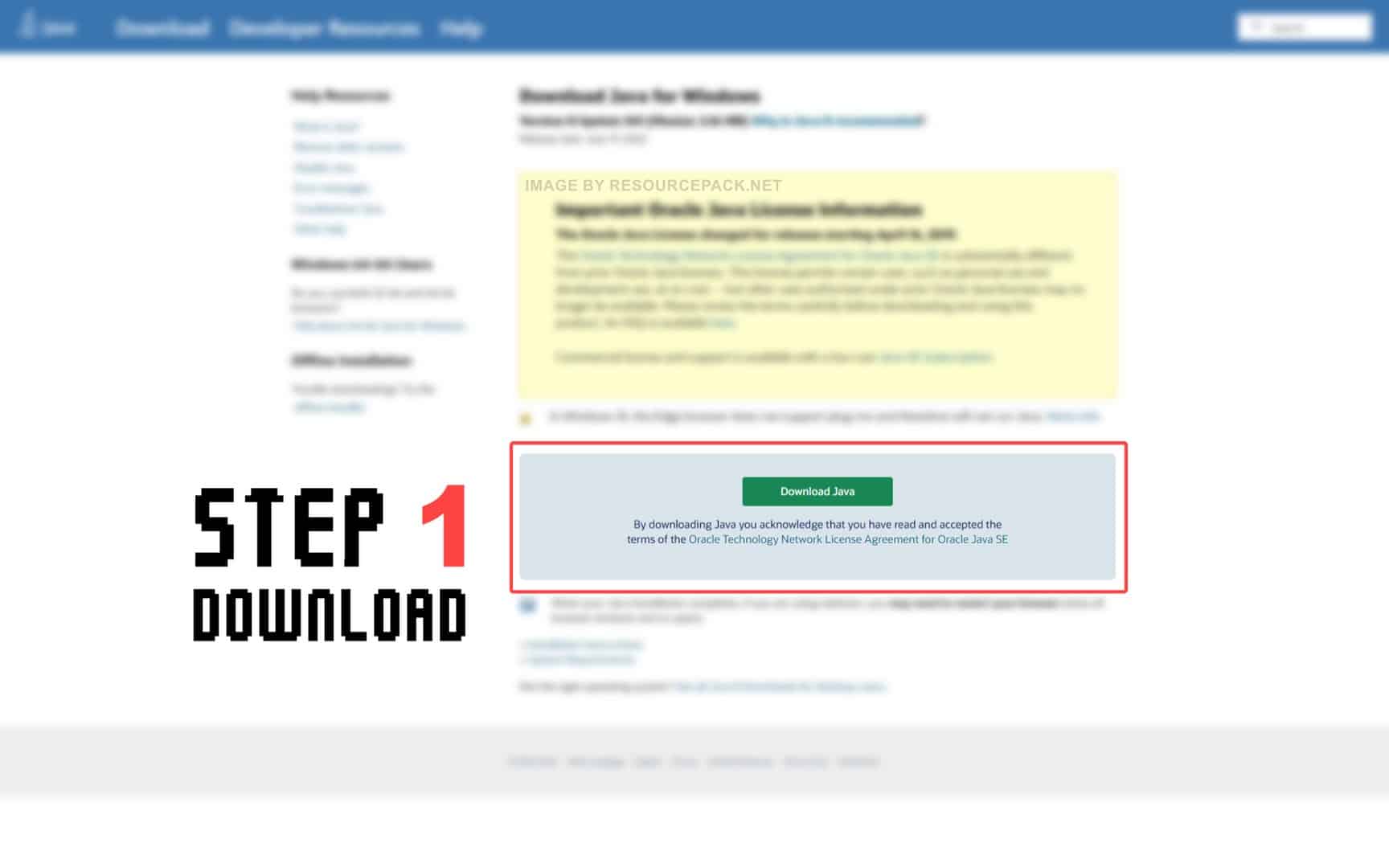
Before we proceed with installing Iris Shaders, you also need to have Java installed on your device in order to be able to run the Iris Shaders universal jar installer. Java is available for Windows, Linux, Mac OS X, and Solaris. Get Java here.
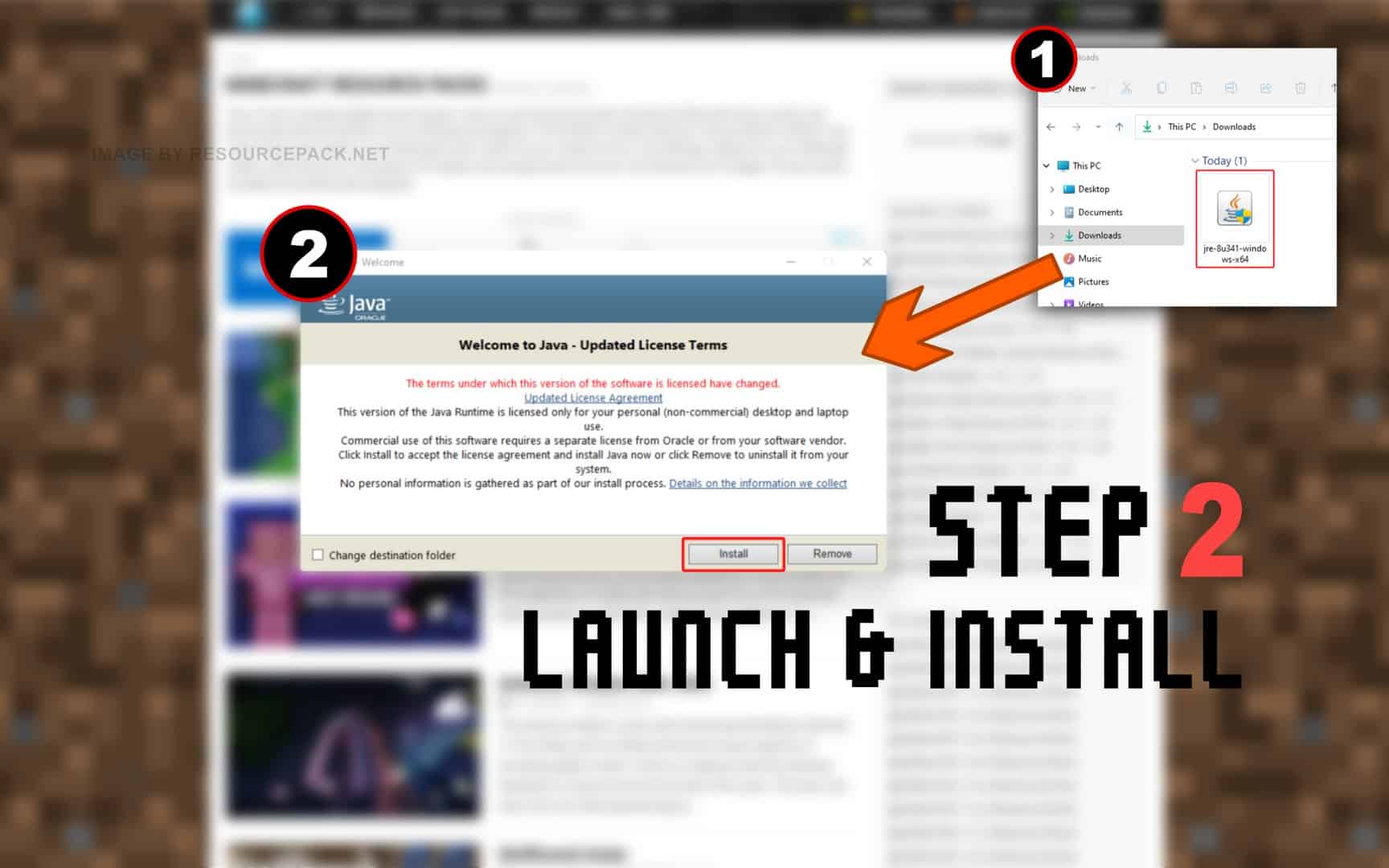
Quick Java Installation Guide:
Click the image to open it full size in a new tab.
- Download Java from the official website here.
- Run the file you just downloaded and click Install.
NOTE: Iris Shaders will only work with the Java Edition of Minecraft. Iris Shaders does not currently work with Bedrock or any other edition.
And now.. Iris Shaders:
Please follow each step carefully if you have never installed Iris Shaders before.
- In the download section (located directly below this guide), you will find a link to the official Iris Shaders website. Click on this link and you should be redirected to the developer’s official website.
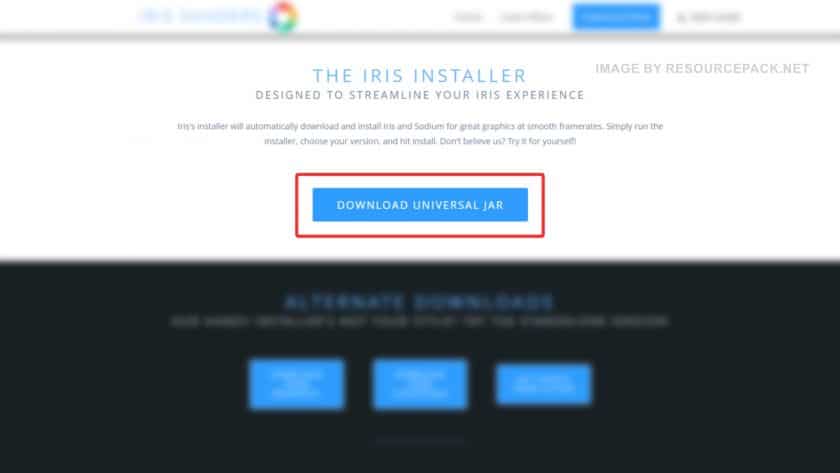
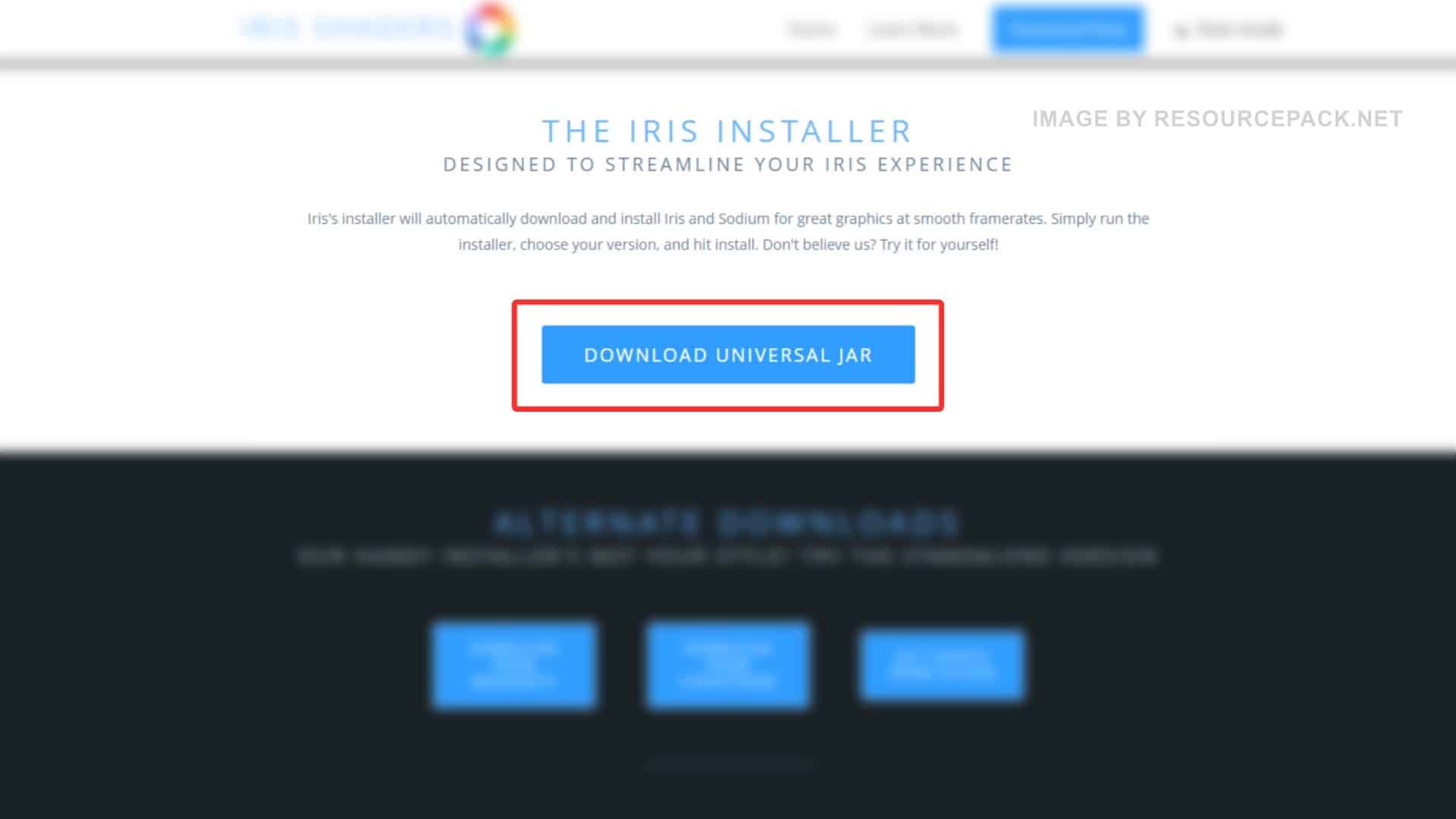
- On the IrisShaders website, you will see a blue “DOWNLOAD UNIVERSAL JAR” button. Click on it.
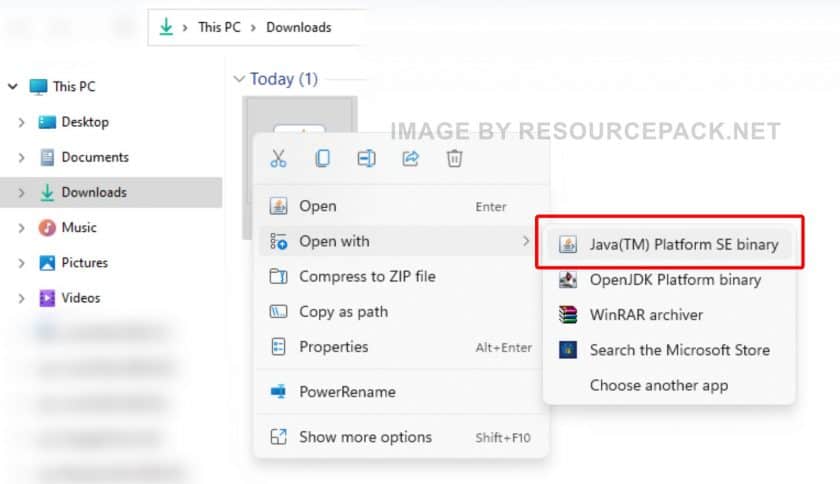
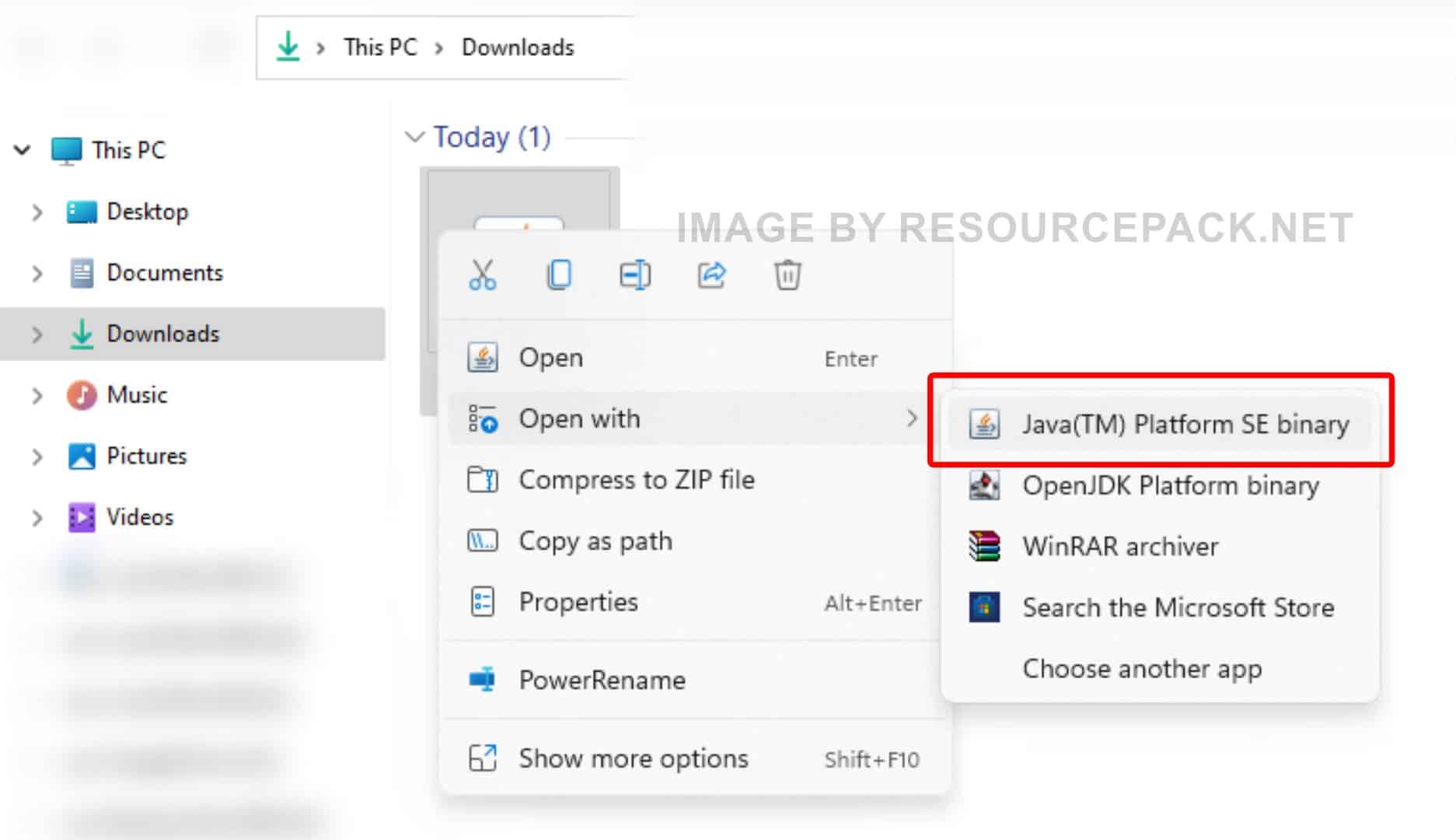
- Once downloaded, open your downloads folder and right-click on the newly downloaded Iris installer file (should be in .jar format), select “Open With”, and then click “Java (TM) Platform SE binary”.
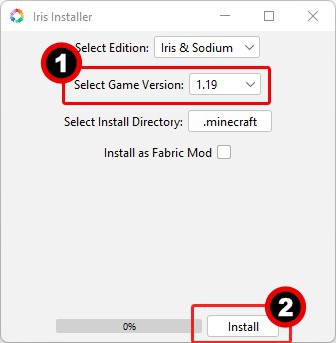
- The following window should appear:

- Under the “Select game version” dropdown, select your preferred Minecraft version and click “Install”.
- After a while, the install button should say “Installation succeeded!” and the progress bar should be 100%.
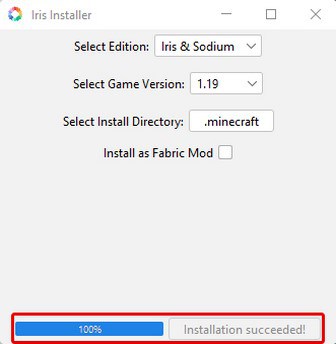
- Iris installed successfully. Now you can close the installer.
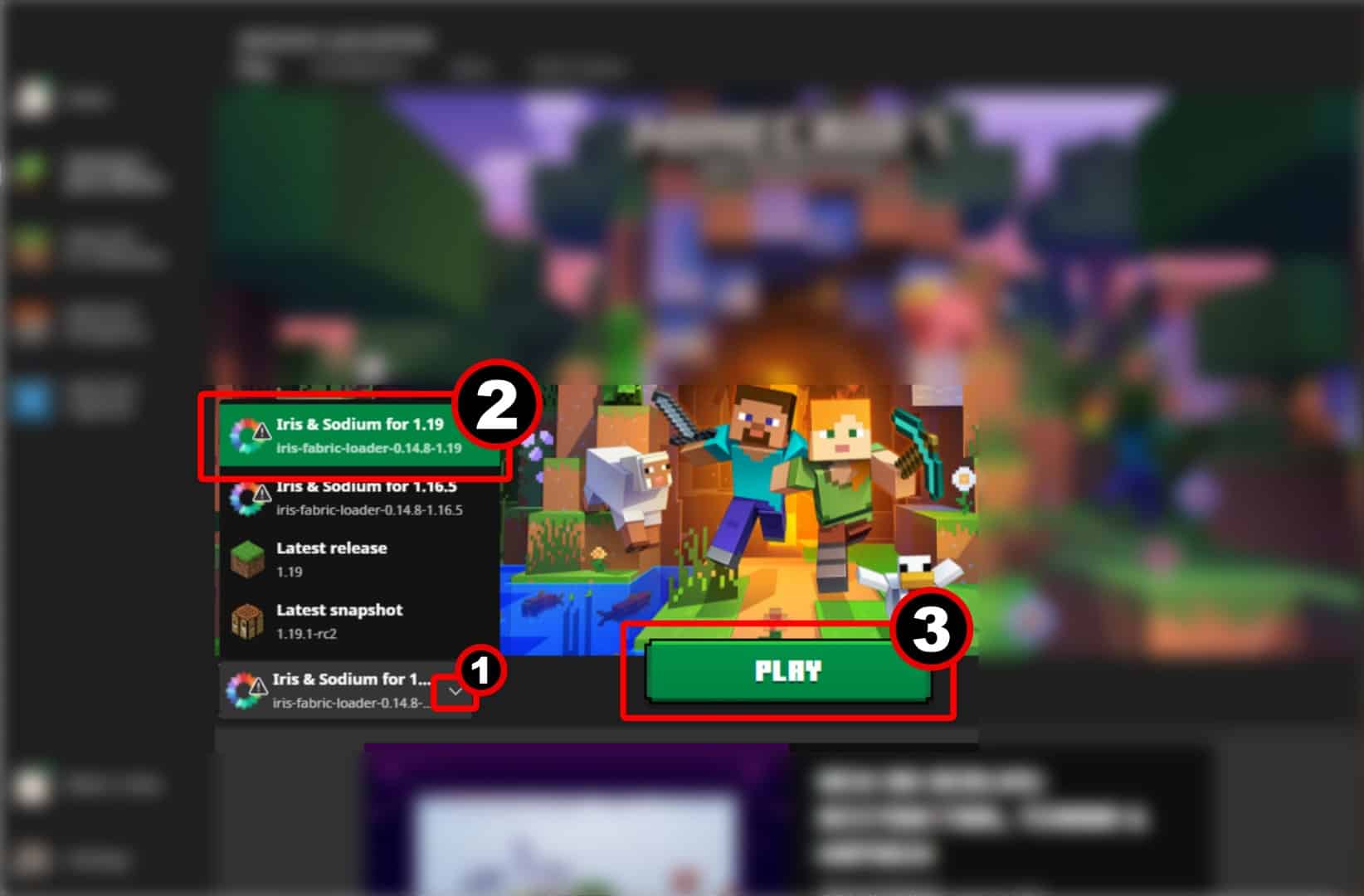
- Run the Minecraft launcher and click on the small arrow to the left of the green “PLAY” button. You will notice that there is a new version called Iris & Sodium for 1.19 (the name may differ in your case depending on which version of Minecraft you are using and which version of IrisShaders you have installed). Select this version and click “PLAY”.
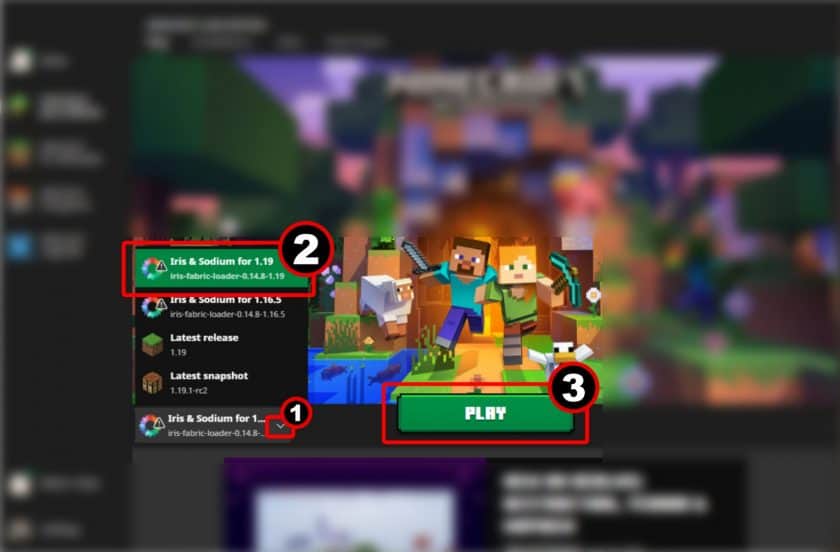
- That’s all. You are playing Minecraft with IrisShaders installed. Now you can search for beautiful shaders and resource packs and enjoy all the optimizations provided by IrisShaders.
Iris Shaders Download
- We do not modify or edit any resource packs. All resource packs, shaders and tools found on this website are linked directly to official sources rather than hosted on our own servers. We provide only the official download links from the original creators to ensure that your files are safe and secure.
- These official links are updated manually and may occasionally stop working when a new version is released. We work hard to keep everything current so that you have a smooth experience. Please let us know in the comments if you find a link that no longer works.
- Minecraft is a trademark of Mojang Studios and has no official connection to this website. Our goal is simply to share the best creations from the community with other players.
- Please consider leaving a comment or voting for your favorite packs. This feedback helps authors improve their projects over time. You can also support the creators directly by visiting the official links located below the download section.
Java Edition:
Download Iris Shaders from Official Website
Curseforge: download starts automatically after a few seconds;
Mediafire: click the big blue button with the text "DOWNLOAD";
Google Drive: in the top right corner you will see a small download icon (down arrow), click it and the download should start;

1,653 votes
Look.. 1653 users have already liked this. Give a diamond if you like it too!


tinypaykitten
I have a macbook and it won’t let me open it
william
Hey, when I open iris, through java, it opens for a second, then closes. I redownloaded java yet its the same issue.
mys4wunii
is iris available for tlaucnher?? if there is can someone tell me how to do it?
matei
After installing Iris and restarting minecraft launcher, iris still isn’t showing when i click the arrow with all the versions.
lot
when I down the iris it is s Microsoft edge file and when I open it, it goes to a blank Microsoft edge download page
potbot
Java SE is installed, sys variable path is set to newest version of Java. but installer wont open (even trusted that file under properties) prompt pops up, and closes
Dan
I cant find Java (TM) Platform SE Binary to open the JAR file
Kris
As long as you’ve got Java installed you can just simply double click on the JAR file.
Aldara
And then?
Sivert
if i do that it opens a menu to choose what app to open it with, and it only shows windows media player legacy and notes?
Eryk
version 1.16.1 isn’t more time supported by iris?
kae
cant get past step 3, I am on windows 11, the option to “open with” doesn’t include any options in the image, and tries to force me to us an “app”, and yes it is a .jar file. Help??