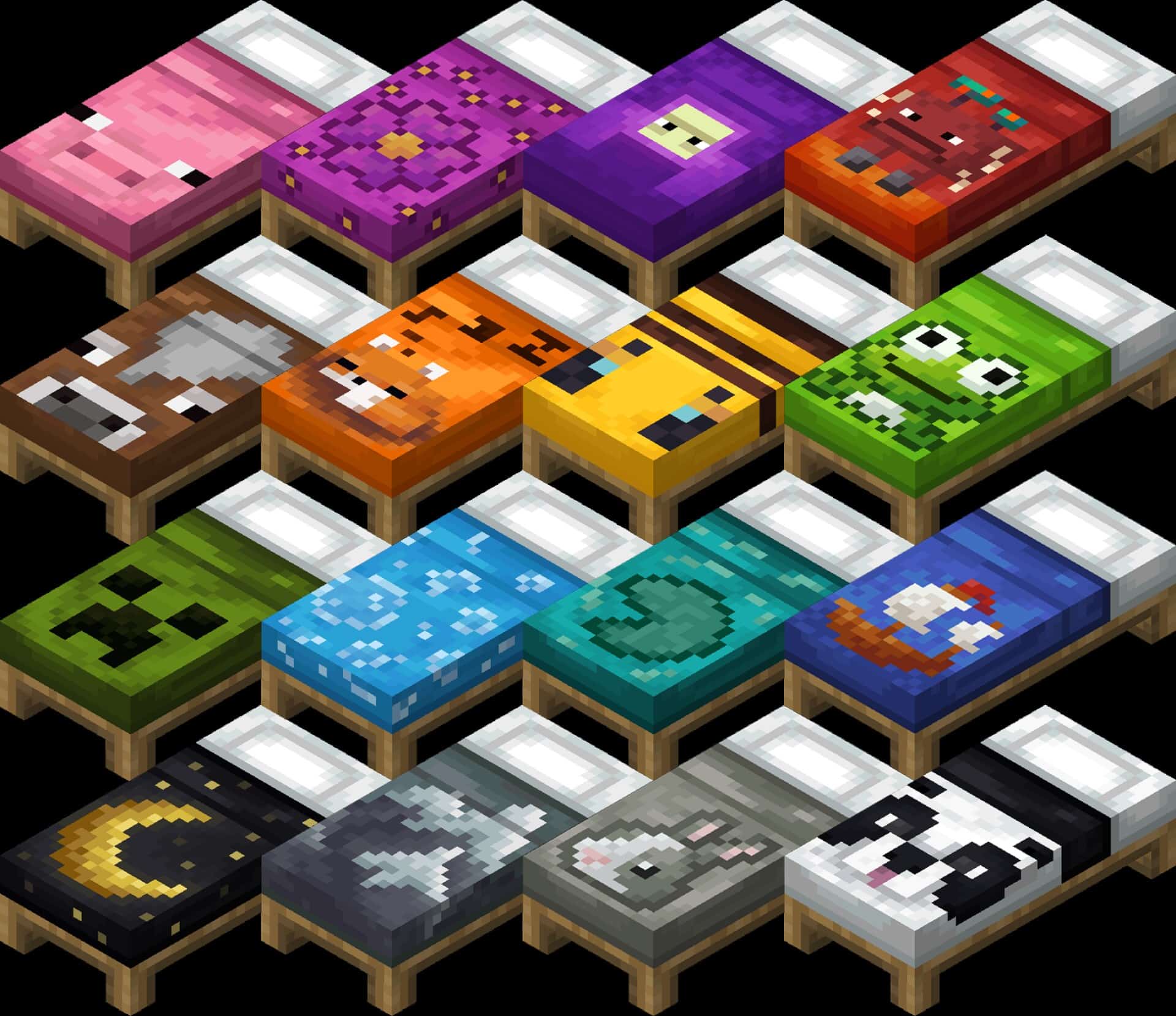
Minecraft has always been about small details that add up to a bigger experience, and that’s where packs like this one shine. Instead of trying to transform the entire game, it takes a single block type and gives it some love. The focus here is on beds, and while that might sound minor at first, it actually makes a big difference for players who care about how their builds look. Beds in Minecraft are used by everyone, whether in survival bases, adventure maps, or creative builds, but they’ve always looked more like placeholders than furniture. With the Fancy Beds resource pack installed, that changes, because suddenly beds aren’t just red or blue rectangles, they’re pieces that fit into your interior design. The main appeal is the variety. Each bed gets a unique texture, and the pack doesn’t stop at swapping colors. Instead, it introduces fun and cute pixel art designs while staying true to the game’s visual style. Some beds have flowers, others might feature animals like frogs or pigs, and a few come with more subtle but polished detailing that helps them feel more distinct. It’s not aiming for realism, but rather for charm, and that charm works well in all kinds of builds. A rustic cabin, for instance, benefits from a bed with a simpler, earthy motif, while a modern house can use a design that feels cleaner and more playful. Because every option still keeps the blocky pixel approach, they blend naturally into the vanilla game. Another thing worth pointing out is how lightweight this pack is. Many resource packs try to cover everything at once, which can put stress on weaker PCs or cause visual clashes when combined with other packs or shaders. This one avoids those problems by keeping its scope tight. Since it only touches the beds, it loads quickly, doesn’t eat performance, and pairs seamlessly with other resource packs. That means you can keep your favorite vanilla-style blocks, or even more complex add-ons, and just let this sit on top without worry. Builders who like to stack resource packs will appreciate how simple that is. It also opens up more options for roleplay or themed worlds. If you’re building a fantasy village, a castle, or even a modern city, you can choose a bed design that matches the setting.
Featured video:
A medieval tavern feels more alive when each room has its own bed style, while a suburban home looks finished with a bed that ties in with its color scheme. That flexibility adds depth without demanding extra effort from the player. For anyone who has ever felt that standard beds were too plain, this is a clean solution. The philosophy here is important too. Rather than going overboard and re-imagining the entire game, the creator chose to improve a single part of it. That care shows in the result. Each texture feels thought out, not rushed, and the consistency makes the whole pack feel polished. Even though it’s small in size, it delivers a noticeable improvement, and that’s why it’s worth attention. It’s the kind of pack you don’t think you need until you try it, and then it becomes hard to remove. In a way, it’s similar to packs like the Porkier Pigs resource pack, which also prove that even small changes can have a big impact on how you play or build. By concentrating on one thing and doing it well, both show that Minecraft doesn’t always need massive overhauls to feel fresh. They serve as reminders that sometimes the smallest textures bring the most satisfaction, especially when they’re part of daily gameplay. Ultimately, what this bed-focused pack achieves is balance. It doesn’t sacrifice performance, it doesn’t clash with other textures, and it doesn’t change the overall look of the game. What it does is give players more personality in one of the most used items in Minecraft. The default game treats beds as a utility while this pack treats them as furniture, as decoration, as something that should reflect the world you’ve built around it. That difference might not be dramatic, but it’s definitely meaningful for those who care about detail. For players who are constantly looking for small but effective ways to polish their Minecraft worlds, this is an easy recommendation. It’s also versatile enough that you can leave it installed long-term without it feeling intrusive or out of place. Much like when trying out the Fancy Beds texture pack, you’ll realize how a few changed textures can make everything around them feel a little more alive. And when you head back into your world after sleeping through the night, you’ll notice that simple things, like seeing the bed in your room, make the whole experience a bit warmer.
Fancy Beds should be compatible with all of these Minecraft versions: 26.1 - 1.21.11 - 1.21.10 - 1.21.9 - 1.21.8 - 1.21.7 - 1.21.6 - 1.21.5 - 1.21.4 - 1.21.3 - 1.21.2 - 1.21.1 - 1.21 - 1.20.6 - 1.20.5 - 1.20.4 - 1.20.3 - 1.20.2 - 1.20.1 - 1.20 - 1.19.4 - 1.19.3 - 1.19.2 - 1.19.1 - 1.19 - 1.18.2 - 1.18.1 - 1.18 - 1.17.1 - 1.17 - 1.16.5 - 1.16.4 - 1.16.3 - 1.16.2 - 1.16.1 - 1.16 - 1.15.2 - 1.15.1 - 1.15 - 1.14.4 - 1.14.3 - 1.14.2 - 1.14 - Bedrock Edition - PE
Fancy Beds — Screenshots
How to install Fancy Beds Resource Pack:
- Most resource packs require Optifine, so be sure to download and install it. – general recommended step for all packs, Optifine is also needed for most shaders
- Download the Fancy Beds texture pack for Minecraft from the download section below. – if there are many different versions, just choose the one you like, is compatible with your version/edition of Minecraft, the one you think your computer can handle in terms of performance.
- Launch the game client through the Minecraft launcher.
- On the main menu, click "Options".
- On the options menu, click "Resource Packs...".
- Click on "Open Resource Pack Folder". – folder titled "resourcepacks" will pop up
- Move the .zip file you downloaded in the first step to the newly opened "resourcepacks" folder.
- Click "Done".
- Click on "Resource Packs..." again.
- Your pack should have appeared in the left window, just hover over it and click on the arrow pointing to the right.
QUICK TIP: Sometimes, when activating a pack, the game may say that the pack is made for a newer or older version of Minecraft. This is just a warning, it does not affect your gameplay in anyway, and you can still activate and enjoy the pack by simply clicking the "Yes" button when prompted.
- Click "Done" again.
- The pack has now been successfully loaded and ready to be used in your world!
Fancy Beds - Comparison Slider #1 beds
Comparison slider #1 for those who want to compare vanilla Minecraft without any texture packs installed (on the left) with Minecraft using this particular texture pack (on the right).
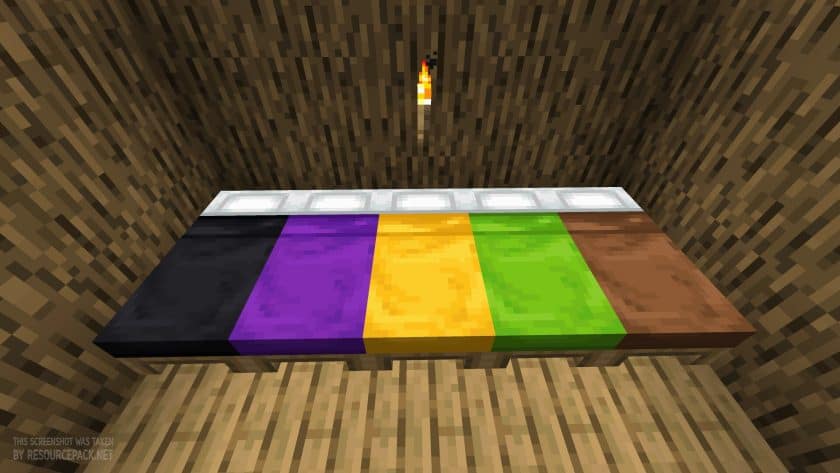 Vanilla
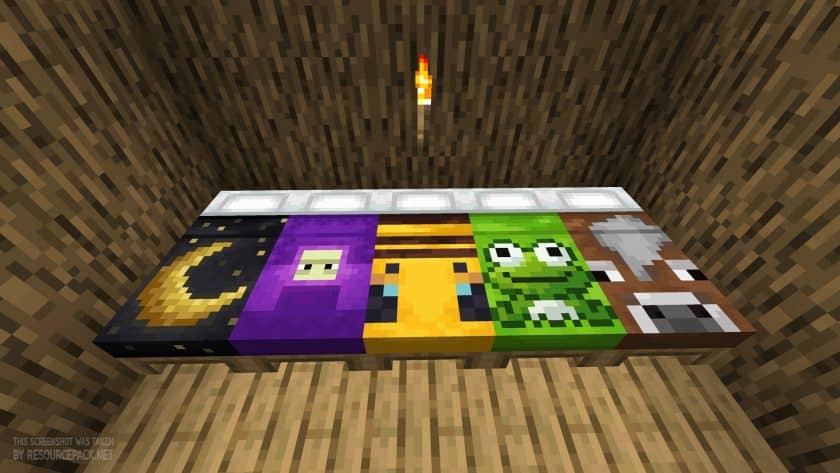 Fancy Beds
Fancy Beds Texture Pack Download
- We do not modify or edit any resource packs. All resource packs, shaders and tools found on this website are linked directly to official sources rather than hosted on our own servers. We provide only the official download links from the original creators to ensure that your files are safe and secure.
- These official links are updated manually and may occasionally stop working when a new version is released. We work hard to keep everything current so that you have a smooth experience. Please let us know in the comments if you find a link that no longer works.
- Minecraft is a trademark of Mojang Studios and has no official connection to this website. Our goal is simply to share the best creations from the community with other players.
- Please consider leaving a comment or voting for your favorite packs. This feedback helps authors improve their projects over time. You can also support the creators directly by visiting the official links located below the download section.
Bedrock Edition:
[16x] [1.21.x] Download Fancy Beds Bedrock Edition Resource Pack
Java Edition:
[16x] [26.1 – 1.14.x] Download Fancy Beds Resource Pack
Curseforge: download starts automatically after a few seconds;
Mediafire: click the big blue button with the text "DOWNLOAD";
Google Drive: in the top right corner you will see a small download icon (down arrow), click it and the download should start;

60 votes
Look.. 60 users have already liked this pack. Give a diamond if you like it too!


Leave a reply
0 comments
Links in comments are not allowed. Comments containing links will be removed.
Before commenting that the resource pack crashed your game, google your crash log. This is usually a graphic card driver issue.