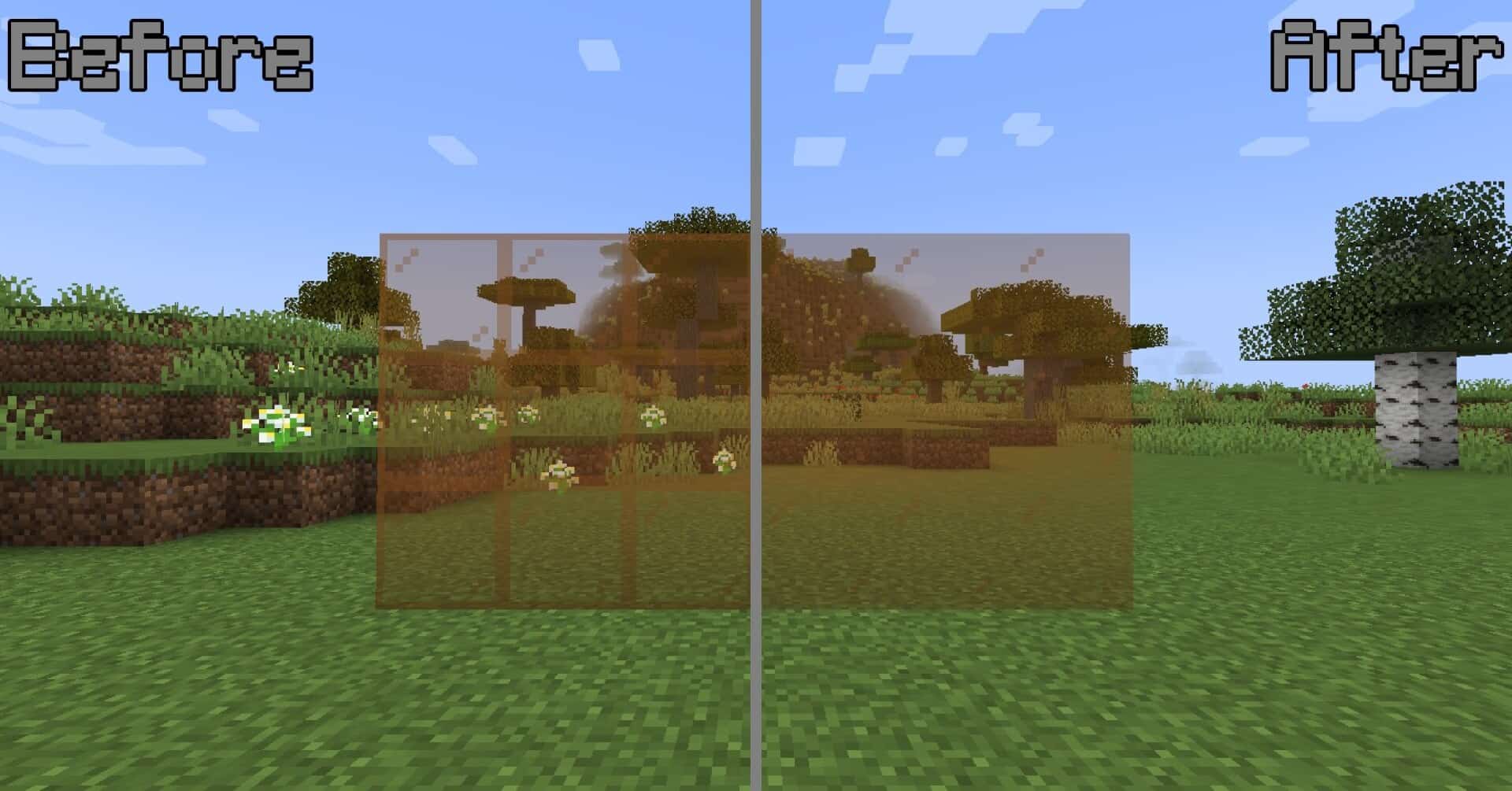
Today we want to talk about a small visual improvement that can influence the way your builds feel when viewed up close or from a distance. The Borderless Glass resource pack changes only one thing, yet the result is easy to notice. In the default game, every glass block has a dark outline. When you place a few glass blocks together, those outlines form a grid that breaks the surface into many squares. Even when the building itself is impressive, the window or glass wall can appear cluttered. The scene behind the glass becomes harder to appreciate because your eyes keep catching on the lines. This pack removes those outlines and gives the glass a smooth and open appearance. For many players, glass plays a role in their favorite builds. Modern houses often rely on wide windows and skylights. Tall towers use glass to create viewing platforms above landscapes. Greenhouses look more natural when light can pass through without distraction. In each of these settings, the removal of borders helps the structure feel more connected with the environment around it. The world looks closer and more open when there are no dark edges reminding you that you are behind a series of blocks. Some players may already know about an older pack named Clear Glass. That pack also removes borders when multiple glass blocks are placed side by side. Clear Glass requires OptiFine, which gives access to special features that allow textures to connect. When large panes are built, only the outer edges appear and the interior remains clear. It produces a tidy look. The limitation appears when you try to use it without OptiFine. Without the added feature support, the effect will not work at all. This is where the Borderless Glass texture pack sets itself apart. It works in a fully vanilla setup. You do not need OptiFine. You do not need fabric or forge. You do not have to adjust settings. You only need to place it in your resource pack folder and enable it in the menu. Just make sure it is on top of all active packs. It works on any world type and on servers as long as they do not force a different pack. It is simple and consistent for anyone who prefers not to rely on mod features. There is a difference in how Clear Glass and Borderless Glass approach the final look. Clear Glass can keep a frame around the outer edge of a large window because OptiFine allows the game to treat connected blocks as a single block. Borderless Glass takes a different path. It removes the border on every single glass block.
Featured video:
It does not matter if you place one block or a full wall of blocks. Every block has no visible edge. The result is a texture with absolute clarity. The author of the pack has explained that this is not a choice based on style alone but a limitation of what can be done in the base game without extra features. Minecraft does not currently support connected textures without external tools. Until that changes, a full borderless approach is the most stable method. Despite this limitation, many players prefer the effect. The lack of any visible seam makes the window look uninterrupted. If you often build with large spans of glass, you may find that your structures appear cleaner and more unified. The absence of borders allows the landscape beyond the window to become the focus. When you look through the glass, you see the world rather than the texture pattern. This creates a feeling of openness that is especially noticeable in scenic builds. This pack can also be practical for technical reasons. Some players cannot run OptiFine on their machine. Others play new snapshots where OptiFine has not been updated yet. Some servers do not allow mods. Some players simply prefer to keep the game close to default and avoid add ons. In all of these situations, having a pack that does not require any extra steps is useful. The appeal of this pack is that it keeps things simple. It does not add anything extra that would distract from the core visuals of Minecraft. It keeps the familiar color and transparency of glass. It does not attempt to introduce effects or new styles. It simply removes a visual element that many players find distracting. This makes it an easy choice for players who want a clearer view without altering the identity of the game. If you find yourself often adjusting your builds to hide the borders on glass or if you have avoided using glass altogether because of how it breaks up a view, this pack may be worth trying. It blends well into most building styles, from medieval castles to floating sky islands. It works quietly in the background and does not ask you to change how you build. You place blocks the same way you always have. You just see a cleaner result when you step back.
Borderless Glass should be compatible with all of these Minecraft versions: 26.1 - 1.21.11 - 1.21.10 - 1.21.9 - 1.21.8 - 1.21.7 - 1.21.6 - 1.21.5 - 1.21.4 - 1.21.3 - 1.21.2 - 1.21.1 - 1.21 - 1.20.6 - 1.20.5 - 1.20.4 - 1.20.3 - 1.20.2 - 1.20.1 - 1.20 - 1.19.4 - 1.19.3 - 1.19.2 - 1.19.1 - 1.19 - 1.18.2 - 1.18.1 - 1.18
Borderless Glass — Screenshots
How to install Borderless Glass Resource Pack:
- Most resource packs require Optifine, so be sure to download and install it. – general recommended step for all packs, Optifine is also needed for most shaders
- Download the Borderless Glass texture pack for Minecraft from the download section below. – if there are many different versions, just choose the one you like, is compatible with your version/edition of Minecraft, the one you think your computer can handle in terms of performance.
- Launch the game client through the Minecraft launcher.
- On the main menu, click "Options".
- On the options menu, click "Resource Packs...".
- Click on "Open Resource Pack Folder". – folder titled "resourcepacks" will pop up
- Move the .zip file you downloaded in the first step to the newly opened "resourcepacks" folder.
- Click "Done".
- Click on "Resource Packs..." again.
- Your pack should have appeared in the left window, just hover over it and click on the arrow pointing to the right.
QUICK TIP: Sometimes, when activating a pack, the game may say that the pack is made for a newer or older version of Minecraft. This is just a warning, it does not affect your gameplay in anyway, and you can still activate and enjoy the pack by simply clicking the "Yes" button when prompted.
- Click "Done" again.
- The pack has now been successfully loaded and ready to be used in your world!
Borderless Glass - Comparison Slider #1
Comparison slider #1 for those who want to compare vanilla Minecraft without any texture packs installed (on the left) with Minecraft using this particular texture pack (on the right).
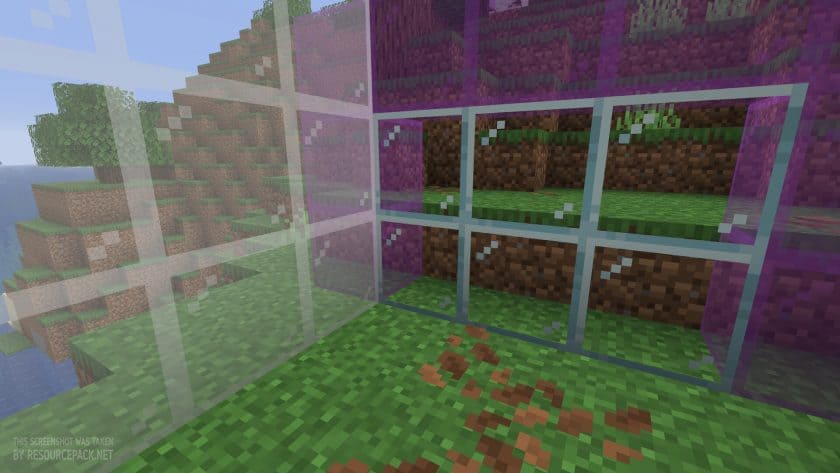 Vanilla
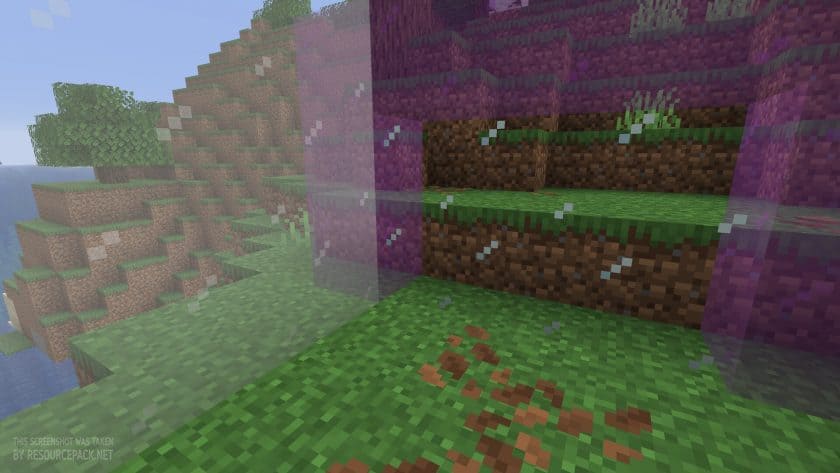 Borderless Glass
Borderless Glass Texture Pack Download
- We do not modify or edit any resource packs. All resource packs, shaders and tools found on this website are linked directly to official sources rather than hosted on our own servers. We provide only the official download links from the original creators to ensure that your files are safe and secure.
- These official links are updated manually and may occasionally stop working when a new version is released. We work hard to keep everything current so that you have a smooth experience. Please let us know in the comments if you find a link that no longer works.
- Minecraft is a trademark of Mojang Studios and has no official connection to this website. Our goal is simply to share the best creations from the community with other players.
- Please consider leaving a comment or voting for your favorite packs. This feedback helps authors improve their projects over time. You can also support the creators directly by visiting the official links located below the download section.
Java Edition:
[16x] [26.1] Download Borderless Glass Resource Pack
[16x] [1.21.x] Download Borderless Glass Resource Pack
[16x] [1.20.x] Download Borderless Glass Resource Pack
[16x] [1.19.x] Download Borderless Glass Resource Pack
[16x] [1.18.x] Download Borderless Glass Resource Pack
Curseforge: download starts automatically after a few seconds;
Mediafire: click the big blue button with the text "DOWNLOAD";
Google Drive: in the top right corner you will see a small download icon (down arrow), click it and the download should start;

82 votes
Look.. 82 users have already liked this pack. Give a diamond if you like it too!


Leave a reply
0 comments
Links in comments are not allowed. Comments containing links will be removed.
Before commenting that the resource pack crashed your game, google your crash log. This is usually a graphic card driver issue.