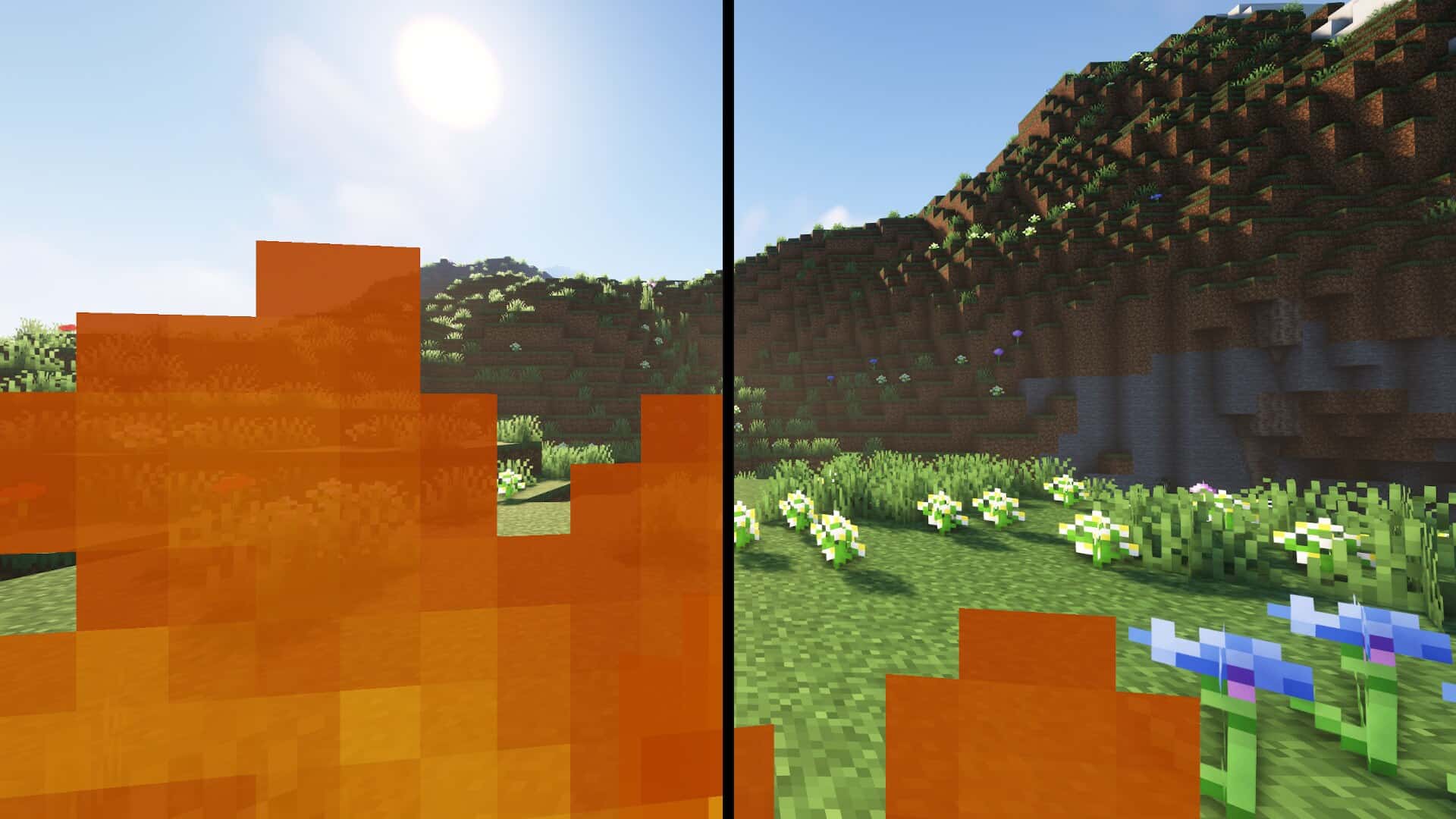
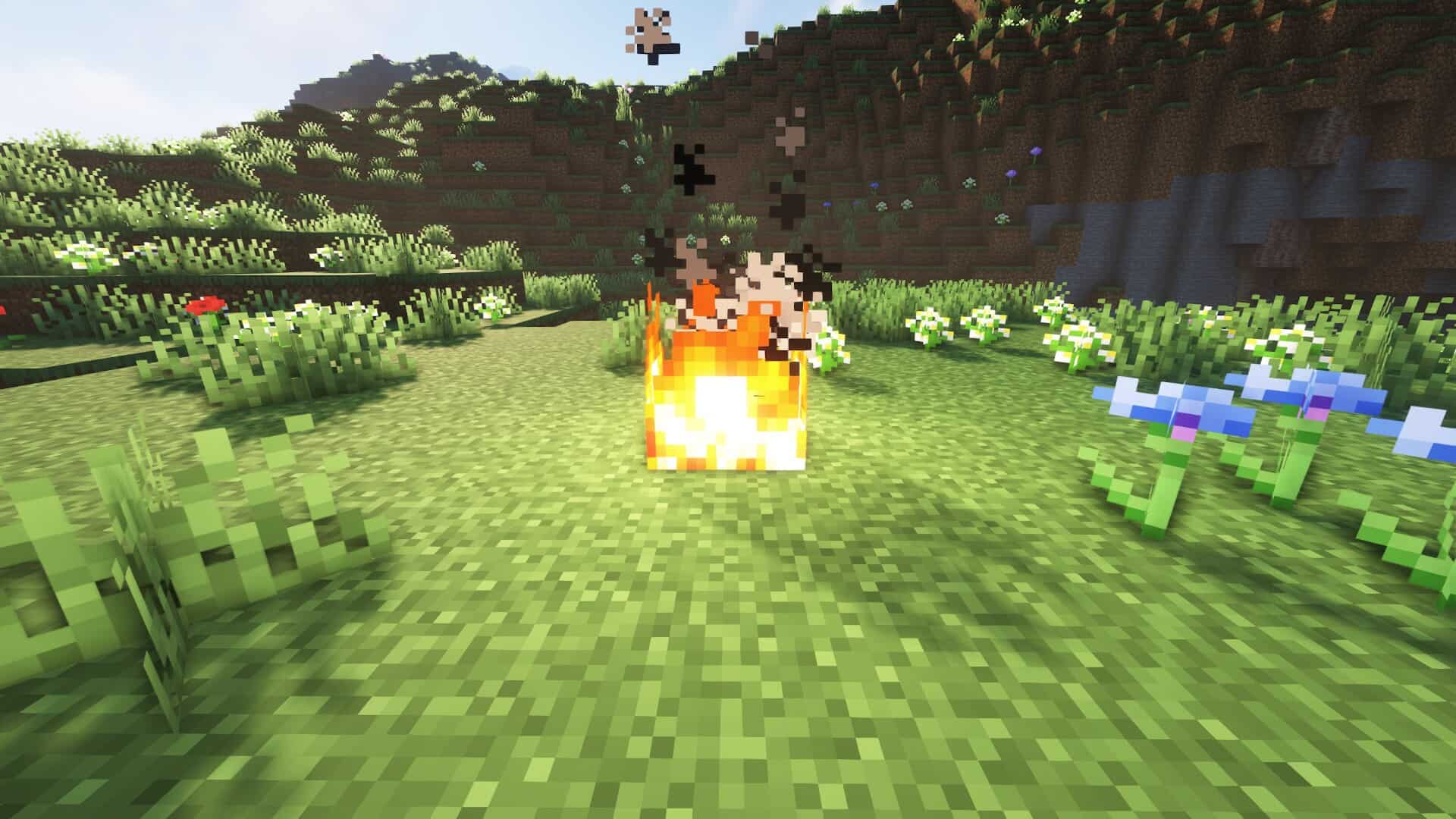
The Low on Fire resource pack by Haikis is one of those rare exceptions we’re happy to make, because while we usually don’t cover tiny packs — the ones that barely touch the game’s visuals — sometimes a small change can have such a big effect on gameplay that it’s worth shouting about. The concept here might not be entirely new, but the execution is so clean, so practical, and so player focused that it deserves your attention, especially if you’re a regular in PvP mode. In fact, we’ll explain in just a moment why this little texture pack can become a huge advantage when the stakes are high. If you’ve ever played Minecraft in its default, vanilla form, you know the problem already — the moment your character catches on fire, enormous flames flood your entire screen. Sure, they look dramatic, but they also make it nearly impossible to see what’s happening around you. Now imagine what happens in a tense PvP battle, when you’re trying to dodge attacks, plan your next move, or just want to run from the fight, and suddenly your vision is engulfed in flames. You lose sight of your opponent, can’t see your surroundings clearly, and often, that’s the moment the fight is over. It’s frustrating, it’s disorienting, and it’s exactly the issue that Low On Fire sets out to fix. So, what does this pack actually do? It reduces both the size and opacity of the flames that appear on your screen when you’re burning. You’ll still know you’re on fire — the visual cue is there — but it no longer dominates your entire field of vision. That means you can keep track of enemy movements, watch the environment, and react faster without the constant battle of looking through a wall of fire. And here’s an important detail — flames on the ground or on blocks remain completely unchanged. This isn’t a full fire rework; it’s a targeted improvement to the screen effect, keeping the look and feel of the world intact while making the player experience smoother. Another reason we really appreciate Low On Fire is its accessibility and simplicity. Unlike many packs that require extra mods like OptiFine or Iris just to function, this one works entirely on its own.
You simply download the .zip file, drop it into your resource packs folder, enable it in the Minecraft menu, and you’re done — no complicated setup, no technical barriers. The pack supports versions all the way from the old 1.6.x builds up to the most recent 1.21.x release, so whether you’re a veteran still running older editions or someone who always plays on the latest update, you can take advantage of its benefits without worrying about compatibility headaches. And it’s not just us who think this way — the Minecraft community has embraced this pack in a big way. With millions of downloads across both Modrinth and CurseForge, players consistently praise how it improves visibility in critical moments. In PvP, every second counts, and every block placement or sword swing can change the outcome. By removing the visual clutter of oversized fire effects, this pack gives you a cleaner view of the action, which can make all the difference between victory and defeat. But even if PvP isn’t your thing, Low On Fire has value in PvE too. Survival mode becomes less stressful when a sudden blaze or lava encounter doesn’t blind you, and exploration is far more comfortable when you can keep an eye on your surroundings no matter what hazards you face. Performance-wise, there’s virtually no downside. Because the pack only alters the fire overlay and leaves everything else untouched, it won’t drop your FPS. In fact, on some very low-end systems, it might even give you a slight boost simply by being lighter than the default animation. That makes it a solid choice for players who want better visibility without sacrificing performance — a win-win situation. Of course there’s one important note to keep in mind that just like the X-Ray Ultimate resource pack, Low On Fire isn’t allowed in official speedruns and may be banned on certain multiplayer servers. That’s because reduced visual obstruction can be seen as a competitive advantage, and fair play is always a priority. Still, if you’re free to use it in your chosen server or SP world, it can be a game changer in both PvP and PvE. In the end, Low On Fire is proof that even a small change can make a big difference.
Low On Fire should be compatible with all of these Minecraft versions: 26.2 - 26.1.2 - 26.1.1 - 26.1 - 1.21.11 - 1.21.10 - 1.21.9 - 1.21.8 - 1.21.7 - 1.21.6 - 1.21.5 - 1.21.4 - 1.21.3 - 1.21.2 - 1.21.1 - 1.21 - 1.20.6 - 1.20.5 - 1.20.4 - 1.20.3 - 1.20.2 - 1.20.1 - 1.20 - 1.19.4 - 1.19.3 - 1.19.2 - 1.19.1 - 1.19 - 1.18.2 - 1.18.1 - 1.18 - 1.17.1 - 1.17 - 1.16.5 - 1.16.4 - 1.16.3 - 1.16.2 - 1.16.1 - 1.16 - 1.15.2 - 1.15.1 - 1.15 - 1.14.4 - 1.14.3 - 1.14.2 - 1.14 - 1.13.2 - 1.13.1 - 1.13 - 1.12.2 - 1.12 - 1.11.2 - 1.11 - 1.10.2 - 1.10 - 1.9.4 - 1.9 - 1.8.9 - 1.8.8 - 1.8.1 - 1.8.6 - 1.8 - 1.7.10 - 1.7.9 - 1.7.4 - 1.7 - 1.6.4 - 1.6.2 - Bedrock Edition - PE
Low On Fire — Screenshots
How to install Low On Fire Resource Pack:
- Most resource packs require Optifine, so be sure to download and install it. – general recommended step for all packs, Optifine is also needed for most shaders
- Download the Low On Fire texture pack for Minecraft from the download section below. – if there are many different versions, just choose the one you like, is compatible with your version/edition of Minecraft, the one you think your computer can handle in terms of performance.
- Launch the game client through the Minecraft launcher.
- On the main menu, click "Options".
- On the options menu, click "Resource Packs...".
- Click on "Open Resource Pack Folder". – folder titled "resourcepacks" will pop up
- Move the .zip file you downloaded in the first step to the newly opened "resourcepacks" folder.
- Click "Done".
- Click on "Resource Packs..." again.
- Your pack should have appeared in the left window, just hover over it and click on the arrow pointing to the right.
QUICK TIP: Sometimes, when activating a pack, the game may say that the pack is made for a newer or older version of Minecraft. This is just a warning, it does not affect your gameplay in anyway, and you can still activate and enjoy the pack by simply clicking the "Yes" button when prompted.
- Click "Done" again.
- The pack has now been successfully loaded and ready to be used in your world!
Low On Fire - Comparison Slider #1
Move slider back and forth to see vanilla Minecraft on the left and the beautiful resource pack on the right.
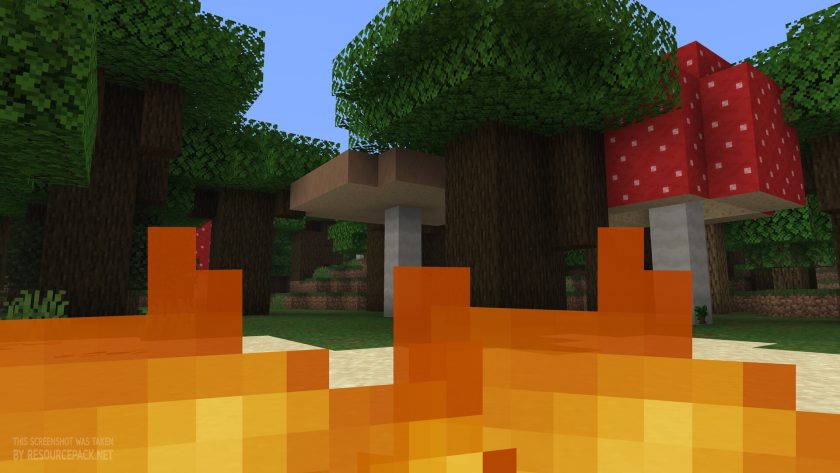 Vanilla
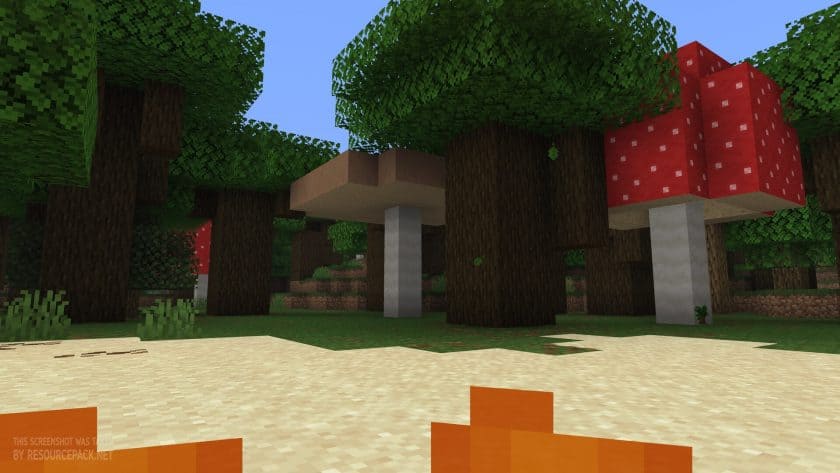 Low On Fire
Low On Fire Texture Pack Download
- We do not modify or edit any resource packs. All resource packs, shaders and tools found on this website are linked directly to official sources rather than hosted on our own servers. We provide only the official download links from the original creators to ensure that your files are safe and secure.
- These official links are updated manually and may occasionally stop working when a new version is released. We work hard to keep everything current so that you have a smooth experience. Please let us know in the comments if you find a link that no longer works.
- Minecraft is a trademark of Mojang Studios and has no official connection to this website. Our goal is simply to share the best creations from the community with other players.
- Please consider leaving a comment or voting for your favorite packs. This feedback helps authors improve their projects over time. You can also support the creators directly by visiting the official links located below the download section.
Bedrock Edition:
Download Low Fire Resource Pack for Bedrock Edition – by TheCubicCompany
Java Edition:
[16x] [26.2.x – 1.21.x] Download Low On Fire Resource Pack
[16x] [1.20.x] Download Low On Fire Resource Pack
[16x] [1.19.x] Download Low On Fire Resource Pack
[16x] [1.18.x] Download Low On Fire Resource Pack
[16x] [1.17.x] Download Low On Fire Resource Pack
[16x] [1.16.x – 1.15.x] Download Low On Fire Resource Pack
[16x] [1.14.x – 1.13.x] Download Low On Fire Resource Pack
[16x] [1.12.x – 1.11.x] Download Low On Fire Resource Pack
[16x] [1.10.x – 1.9.x] Download Low On Fire Resource Pack
[16x] [1.8.x – 1.6.x] Download Low On Fire Resource Pack
Curseforge: download starts automatically after a few seconds;
Mediafire: click the big blue button with the text "DOWNLOAD";
Google Drive: in the top right corner you will see a small download icon (down arrow), click it and the download should start;

189 votes
Look.. 189 users have already liked this pack. Give a diamond if you like it too!



hi
hello my friend
anik6386
cool
somebody that likes this resource pack
So cool bro