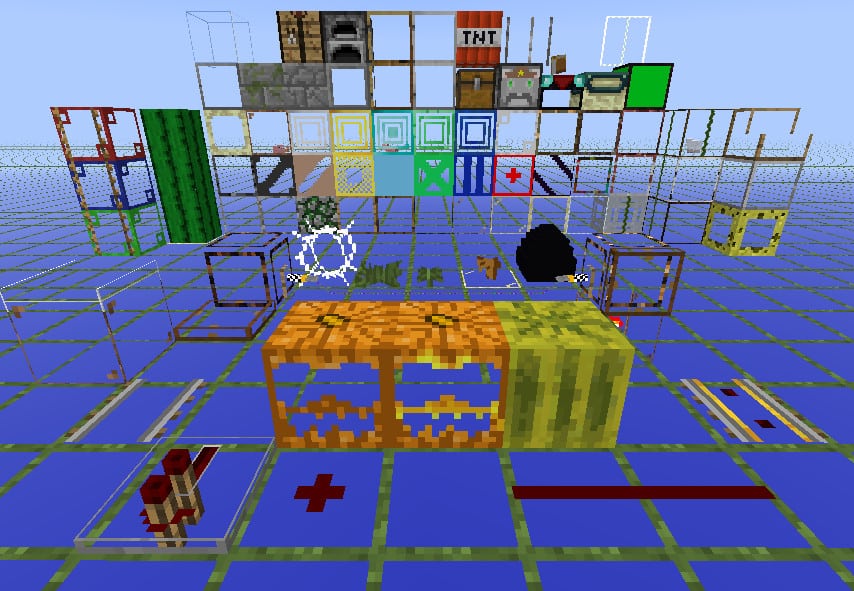
Let us be honest, we have all had those mining trips where we dig for hours and find almost nothing. The StrongestCraft resource pack by Eraiya exists to end that pain. It is an Xray pack, which means it turns most ordinary blocks transparent so that ores and other treasures hiding underground become easy to spot. This pack does not care about looking pretty. Its whole job is to help you find diamonds, gold, and other goodies without tearing through every layer of stone. A quick heads up before you get too excited. This pack is not made for everyday normal play. It shines when you are short on time and just want to grab some resources fast. Also, since it is a resource pack, there is no magic button to switch it on and off instantly. You have to open your settings and swap it manually every time, which can get a little annoying, but that is just how packs work.
Now the serious part. On multiplayer servers, Xray packs are usually treated as cheating, and using one can get you banned or punished. Most servers do not allow them, so check the rules first. Our honest advice is to stick to singleplayer or your own private server where nobody gets hurt. StrongestCraft comes in three versions to fit different needs. The Default version makes almost everything see through, giving you the full underground view. The Casual version keeps common blocks like dirt, grass, stone, and sand solid and normal, so the effect is gentler. Then there is the F&MF version, which stands for Fortress and Mycelium Finder. It makes Nether fortresses and mycelium areas much easier to spot from far away, though those features are drawn solid, so you cannot see through them once you arrive.
StrongestCraft should be compatible with all of these Minecraft versions: 1.8.9 - 1.8.8 - 1.8.1 - 1.8.6 - 1.8 - 1.7.10 - 1.7.9 - 1.7.4 - 1.7 - 1.6.4 - 1.6.2
StrongestCraft — Screenshots
How to install StrongestCraft Resource Pack:
- Most resource packs require Optifine, so be sure to download and install it. – general recommended step for all packs, Optifine is also needed for most shaders
- Download the StrongestCraft texture pack for Minecraft from the download section below. – if there are many different versions, just choose the one you like, is compatible with your version/edition of Minecraft, the one you think your computer can handle in terms of performance.
- Launch the game client through the Minecraft launcher.
- On the main menu, click "Options".
- On the options menu, click "Resource Packs...".
- Click on "Open Resource Pack Folder". – folder titled "resourcepacks" will pop up
- Move the .zip file you downloaded in the first step to the newly opened "resourcepacks" folder.
- Click "Done".
- Click on "Resource Packs..." again.
- Your pack should have appeared in the left window, just hover over it and click on the arrow pointing to the right.
QUICK TIP: Sometimes, when activating a pack, the game may say that the pack is made for a newer or older version of Minecraft. This is just a warning, it does not affect your gameplay in anyway, and you can still activate and enjoy the pack by simply clicking the "Yes" button when prompted.
- Click "Done" again.
- The pack has now been successfully loaded and ready to be used in your world!
StrongestCraft Texture Pack Download
- We do not modify or edit any resource packs. All resource packs, shaders and tools found on this website are linked directly to official sources rather than hosted on our own servers. We provide only the official download links from the original creators to ensure that your files are safe and secure.
- These official links are updated manually and may occasionally stop working when a new version is released. We work hard to keep everything current so that you have a smooth experience. Please let us know in the comments if you find a link that no longer works.
- Minecraft is a trademark of Mojang Studios and has no official connection to this website. Our goal is simply to share the best creations from the community with other players.
- Please consider leaving a comment or voting for your favorite packs. This feedback helps authors improve their projects over time. You can also support the creators directly by visiting the official links located below the download section.
Java Edition:
[16x – 64x] [1.8.x – 1.6.x] Download StrongestCraft Resource Pack – Default
[16x – 64x] [1.8.x – 1.6.x] Download StrongestCraft Resource Pack – F&MF
[16x – 64x] [1.8.x – 1.6.x] Download StrongestCraft Resource Pack – Casual
Curseforge: download starts automatically after a few seconds;
Mediafire: click the big blue button with the text "DOWNLOAD";
Google Drive: in the top right corner you will see a small download icon (down arrow), click it and the download should start;

605 votes
Look.. 605 users have already liked this pack. Give a diamond if you like it too!


Kaey
This crashed my game. How do I fix it?
Admin
Resource packs rarely crash the game, most likely it is the mods or shaders you are using. Try installing a resource pack after removing/disabling all mods and see if the game crashes again.
me
guys this crashed my game what do i do!!!
King Kwest
This works in eaglercraft too
MM_z
really ???
katerina styl
i play eagler craft too
Lps Jessie
did not work for me :C
idiot
ok it got it lol
Norbert Hargitai
XD Windows XP
93498043computer
i feel sad for using this not fari!!
killer
its really good