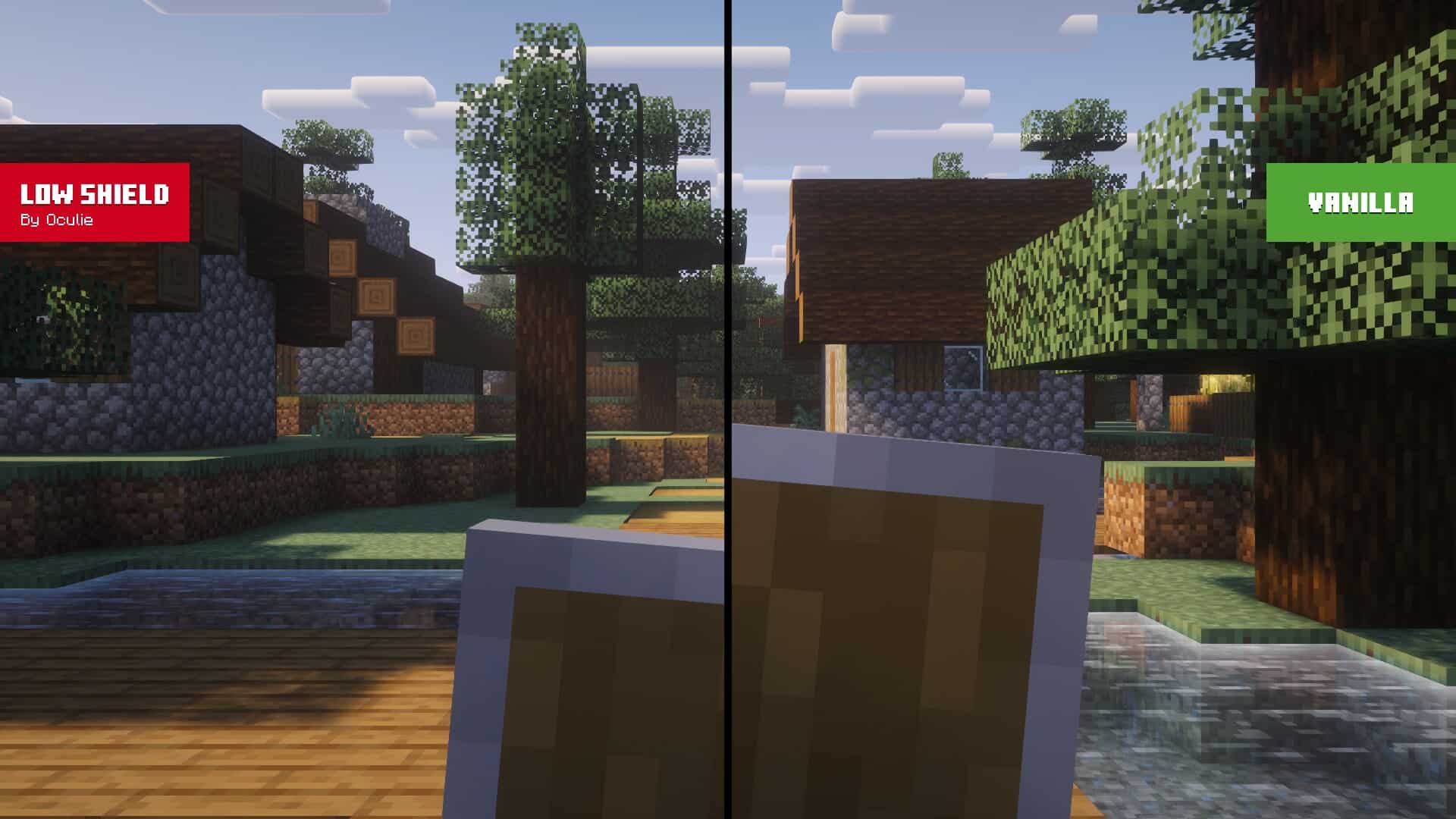
Have you ever noticed how the tiniest Minecraft packs sometimes get the biggest love? The Low Shield resource pack is a perfect example of that, because all it does is make one single thing on your screen smaller, and players still absolutely adore it. There is a fun little mystery sitting at the heart of the Minecraft community. Some creators spend months pouring their hearts into huge texture projects that change every single block in the game, and those packs barely get any attention. Then someone else comes along, spends an afternoon fixing one small annoying thing, and suddenly millions of players grab it. There is no clean answer to why this happens, but we do know one thing for sure. When a pack removes something that has been bugging players for years, people notice, and people share it. So what exactly does Low Shield do? Picture this. You are in the middle of a fight, you raise your shield to block an incoming hit, and suddenly a big chunk of your screen disappears behind your own hand. That giant shield takes up so much space that you can barely see the world in front of you, and it feels really frustrating in the heat of the moment. Low Shield texture pack simply makes that held shield smaller, so your view stays nice and clear while you defend yourself. It is such a simple idea that you almost wonder why nobody thought of it sooner. Where this pack really shines is PvP. If you enjoy PvP’ing other players, then you know how much every little bit of vision matters. When your shield covers half the screen, you cannot really read what your opponent is doing. Are they winding up a swing? Are they backing away to drink a potion? With a smaller shield, you can watch their every move while staying protected at the same time.
That tiny bit of extra sight can honestly be the difference between winning and losing a close duel. PvP has always been a huge part of Minecraft across so many versions, so a pack like this one will always find a happy crowd. Survival players get plenty of joy out of it too. Maybe you are creeping through a cave full of creepers, or walking a narrow path over lava with your shield up just in case. In moments like that, seeing more of the world around you is a real comfort. Hostile mobs love to sneak up on you, and a smaller shield means fewer nasty surprises waiting just outside your view. One important thing to understand is that this pack changes looks only. Your shield still protects you in exactly the same way. Damage reduction, blocking, and every other game rule stay completely untouched, because this is a resource pack and not a mod. If you wanted the actual mechanics to behave differently, then mods are what you would need to look into. Low Shield just quietly removes a visual annoyance and nothing more, which is exactly what it promises. Performance wise there is nothing to worry about at all. Since only one element of the game is touched, the pack is about as light as a resource pack can possibly be. If your computer runs vanilla Minecraft without any problems, then it will run this pack the exact same way. There is also nothing extra needed to make it work. No OptiFine, no Fabric, no other tools of any kind. It runs on plain vanilla Minecraft, which honestly makes it friendly for every type of player out there. A nice bonus is that it plays well with other small packs built around the same idea. Low On Fire shrinks the annoying fire effect that covers your screen when you burn, and Borderless Glass cleans up your view when you look through glass. Stack all of these together and you get a wonderfully clear screen without changing the classic Minecraft look at all.
Low Shield should be compatible with all of these Minecraft versions: 26.3 - 26.2 - 26.1.2 - 26.1.1 - 26.1 - 1.21.11 - 1.21.10 - 1.21.9 - 1.21.8 - 1.21.7 - 1.21.6 - 1.21.5 - 1.21.4 - 1.21.3 - 1.21.2 - 1.21.1 - 1.21 - 1.20.6 - 1.20.5 - 1.20.4 - 1.20.3 - 1.20.2 - 1.20.1 - 1.20 - Bedrock Edition - PE
Low Shield — Screenshots
How to install Low Shield Resource Pack:
- Most resource packs require Optifine, so be sure to download and install it. – general recommended step for all packs, Optifine is also needed for most shaders
- Download the Low Shield texture pack for Minecraft from the download section below. – if there are many different versions, just choose the one you like, is compatible with your version/edition of Minecraft, the one you think your computer can handle in terms of performance.
- Launch the game client through the Minecraft launcher.
- On the main menu, click "Options".
- On the options menu, click "Resource Packs...".
- Click on "Open Resource Pack Folder". – folder titled "resourcepacks" will pop up
- Move the .zip file you downloaded in the first step to the newly opened "resourcepacks" folder.
- Click "Done".
- Click on "Resource Packs..." again.
- Your pack should have appeared in the left window, just hover over it and click on the arrow pointing to the right.
QUICK TIP: Sometimes, when activating a pack, the game may say that the pack is made for a newer or older version of Minecraft. This is just a warning, it does not affect your gameplay in anyway, and you can still activate and enjoy the pack by simply clicking the "Yes" button when prompted.
- Click "Done" again.
- The pack has now been successfully loaded and ready to be used in your world!
Low Shield - Comparison Slider #1
Move slider back and forth to see vanilla Minecraft on the left and the beautiful resource pack on the right.
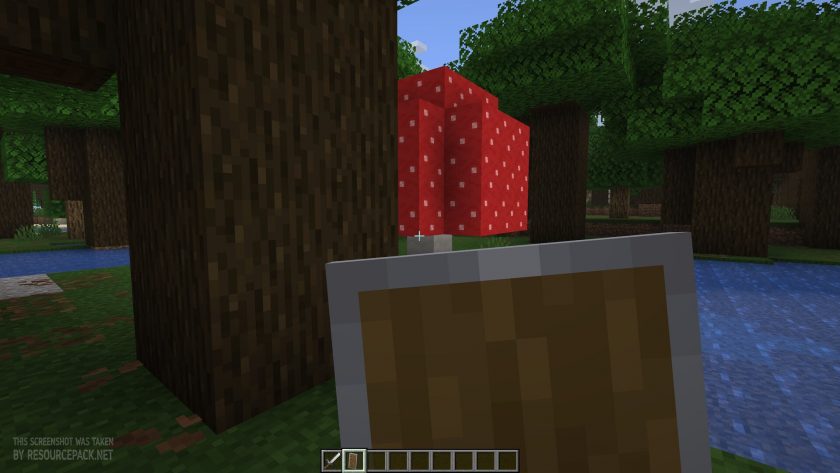 Vanilla
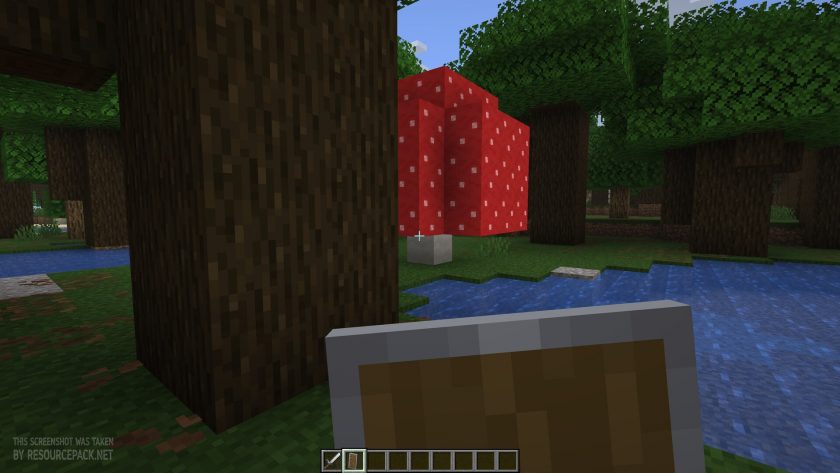 Low Shield
Low Shield Texture Pack Download
- We do not modify or edit any resource packs. All resource packs, shaders and tools found on this website are linked directly to official sources rather than hosted on our own servers. We provide only the official download links from the original creators to ensure that your files are safe and secure.
- These official links are updated manually and may occasionally stop working when a new version is released. We work hard to keep everything current so that you have a smooth experience. Please let us know in the comments if you find a link that no longer works.
- Minecraft is a trademark of Mojang Studios and has no official connection to this website. Our goal is simply to share the best creations from the community with other players.
- Please consider leaving a comment or voting for your favorite packs. This feedback helps authors improve their projects over time. You can also support the creators directly by visiting the official links located below the download section.
Bedrock Edition:
Download Low Shield Resource Pack for Bedrock Edition
Java Edition:
[16x] [26.3.x – 1.21.x] Download Low Shield Resource Pack
[16x] [1.20.x] Download Low Shield Resource Pack
Curseforge: download starts automatically after a few seconds;
Mediafire: click the big blue button with the text "DOWNLOAD";
Google Drive: in the top right corner you will see a small download icon (down arrow), click it and the download should start;

3 votes
Look.. 3 users have already liked this pack. Give a diamond if you like it too!



Leave a reply
0 comments
Links in comments are not allowed. Comments containing links will be removed.
If your comments are consistently being deleted, please be sure to review our Comment Policy.