Hundreds of resource packs get released for Minecraft every single month, and the Invisible Item Frames resource pack is one of those small ones that ended up being really useful. Some packs completely change how the whole game looks, while others only make small tweaks, and usually those small tweaks are the pretty useful ones. This pack is a tiny change. It does not touch any visuals, any interface elements, or any sounds, except for one single item, the item frame itself. To be fair, item frames are not ugly at all. They are more than okay, and they are a handy item in many situations. Sometimes all we want is a little decoration in our world, and item frames are often used exactly for that. They are amazing for putting a few items on walls or on top of other blocks. You just place the frame, put your favorite item inside, and the frame displays it for everyone to see. The one thing that can get a bit annoying is the border around the frame. Every item frame has that wooden border around it. One or two frames on a decent sized building look fine, but once you start adding more and more of them, the whole build can start looking messy. And that is exactly where this pack comes in handy, because it makes the frames invisible while keeping the items inside them fully visible. The pack was created by MattyWalker, and it offers a simple way to improve your builds and decorations by removing the wooden border that normally surrounds displayed items. Instead of appearing inside a visible frame, your maps, tools, weapons, and other items can look like they are attached straight to the wall or to any other surface. It is also a very popular pack, with millions of downloads across the platforms where it is published, so clearly a lot of players wanted exactly this.
The main feature is simple. Regular item frames become visually transparent, and only the item inside stays visible. This makes a huge difference in decorative builds, especially when you want to show off swords, tools, food, blocks, or other collectible items without the wooden outline around them. The result is a cleaner look that fits naturally into modern houses, shops, storage rooms, museums, and all kinds of custom interiors. And honestly, it is not just for fancy modern houses. Even your tiny dirt house can look better with this thing, so we highly recommend it unless you need the frame borders for something else. By the way, invisible item frames are also great for creating custom signs. Instead of placing a sign and writing text on it, you can just use an item frame to mark different storage areas. For example, if you have a separate storage room for your diamonds and emeralds, put an item frame on the wall above the door and drop a diamond inside. Voila! No text signs needed, it looks cleaner, and you instantly know what that room is for in your world. You can do the same thing for your armory room by putting an armor piece or a sword above the entrance. It works for kitchens, enchanting rooms, potion labs, and really any room where one item tells the whole story. Another great thing is that you do not need any stronger hardware to run this pack. First of all, it works on vanilla Minecraft, so you do not need Optifine or any other mods for it. It also runs perfectly fine together with both Optifine and Sodium with Iris, and it does not affect your performance in any way, since it only changes one single item. If your computer handles vanilla Minecraft without issues, this pack will not cause you any trouble at all. On top of that, you can use it together with any other resource pack you like, almost like an add-on. Just put it above your main pack and you are good to go.
Invisible Item Frames should be compatible with all of these Minecraft versions: 26.3 - 26.2 - 26.1.2 - 26.1.1 - 26.1 - 1.21.11 - 1.21.10 - 1.21.9 - 1.21.8 - 1.21.7 - 1.21.6 - 1.21.5 - 1.21.4 - 1.21.3 - 1.21.2 - 1.21.1 - 1.21 - 1.20.6 - 1.20.5 - 1.20.4 - 1.20.3 - 1.20.2 - 1.20.1 - 1.20 - 1.19.4 - 1.19.3 - 1.19.2 - 1.19.1 - 1.19 - 1.18.2 - 1.18.1 - 1.18 - 1.17.1 - 1.17 - 1.16.5 - 1.16.4 - 1.16.3 - 1.16.2 - 1.16.1 - 1.16 - 1.15.2 - 1.15.1 - 1.15 - 1.14.4 - 1.14.3 - 1.14.2 - 1.14 - 1.13.2 - 1.13.1 - 1.13 - 1.12.2 - 1.12 - 1.11.2 - 1.11 - 1.10.2 - 1.10 - 1.9.4 - 1.9 - 1.8.9 - 1.8.8 - 1.8.1 - 1.8.6 - 1.8 - 1.7.10 - 1.7.9 - 1.7.4 - 1.7 - 1.6.4 - 1.6.2 - 1.5.2
Invisible Item Frames — Screenshots
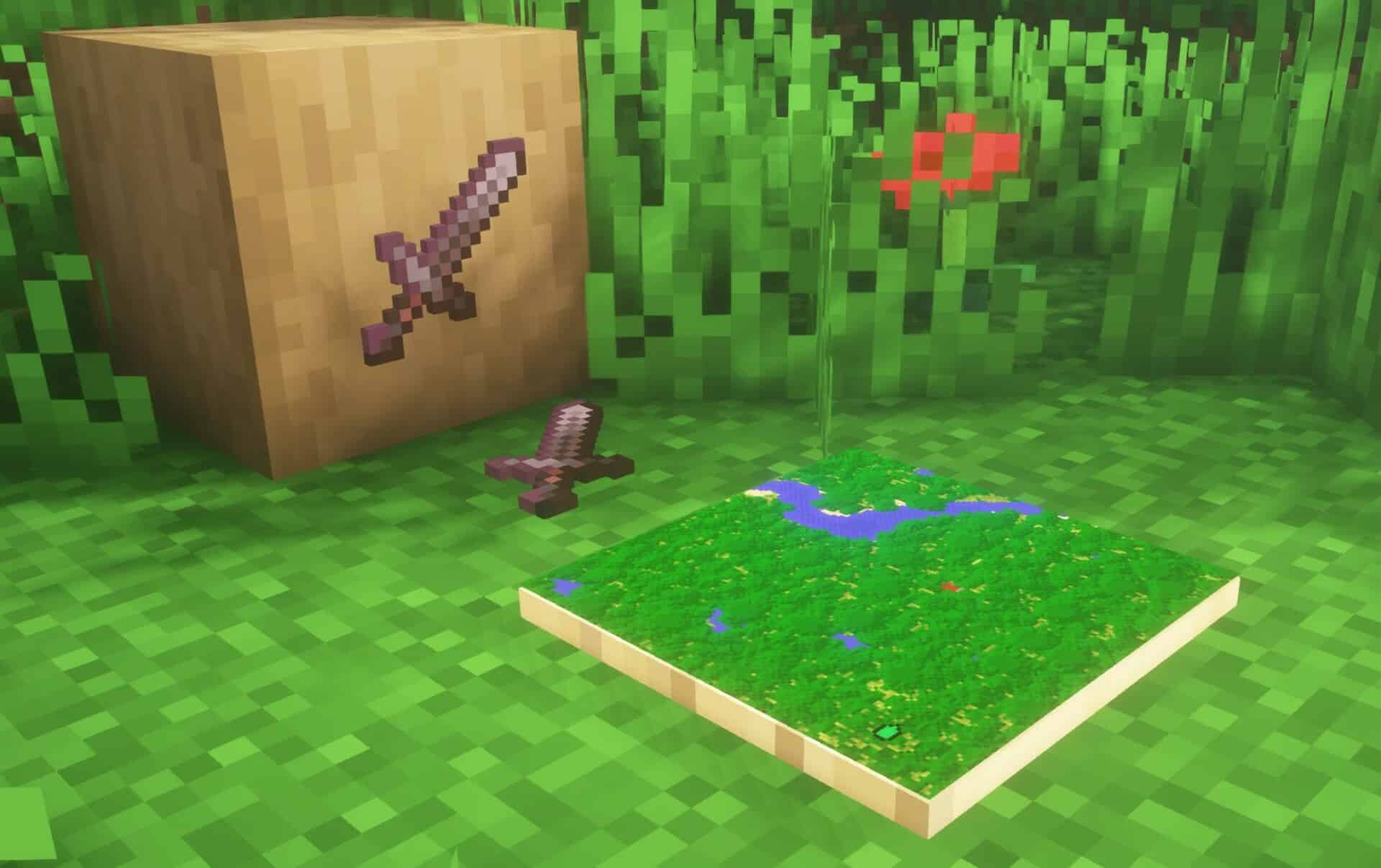
How to install Invisible Item Frames Resource Pack:
- Most resource packs require Optifine, so be sure to download and install it. – general recommended step for all packs, Optifine is also needed for most shaders
- Download the Invisible Item Frames texture pack for Minecraft from the download section below. – if there are many different versions, just choose the one you like, is compatible with your version/edition of Minecraft, the one you think your computer can handle in terms of performance.
- Launch the game client through the Minecraft launcher.
- On the main menu, click "Options".
- On the options menu, click "Resource Packs...".
- Click on "Open Resource Pack Folder". – folder titled "resourcepacks" will pop up
- Move the .zip file you downloaded in the first step to the newly opened "resourcepacks" folder.
- Click "Done".
- Click on "Resource Packs..." again.
- Your pack should have appeared in the left window, just hover over it and click on the arrow pointing to the right.
QUICK TIP: Sometimes, when activating a pack, the game may say that the pack is made for a newer or older version of Minecraft. This is just a warning, it does not affect your gameplay in anyway, and you can still activate and enjoy the pack by simply clicking the "Yes" button when prompted.
- Click "Done" again.
- The pack has now been successfully loaded and ready to be used in your world!
Invisible Item Frames - Comparison Slider #1
Move slider back and forth to see vanilla Minecraft on the left and the beautiful resource pack on the right.
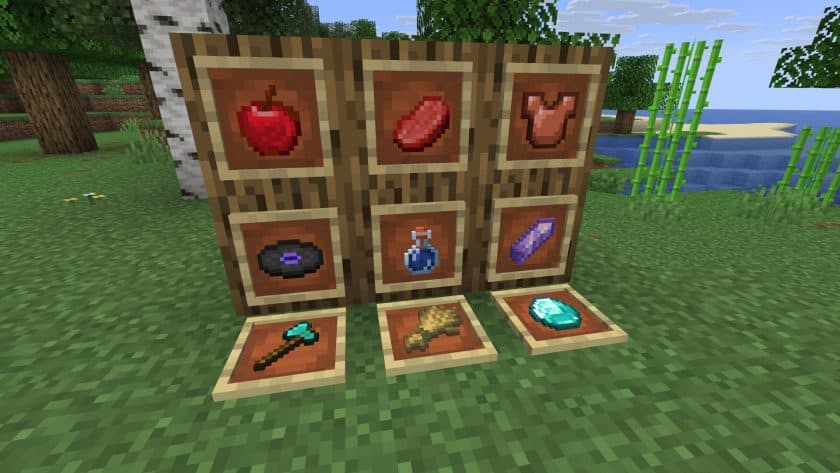 Vanilla
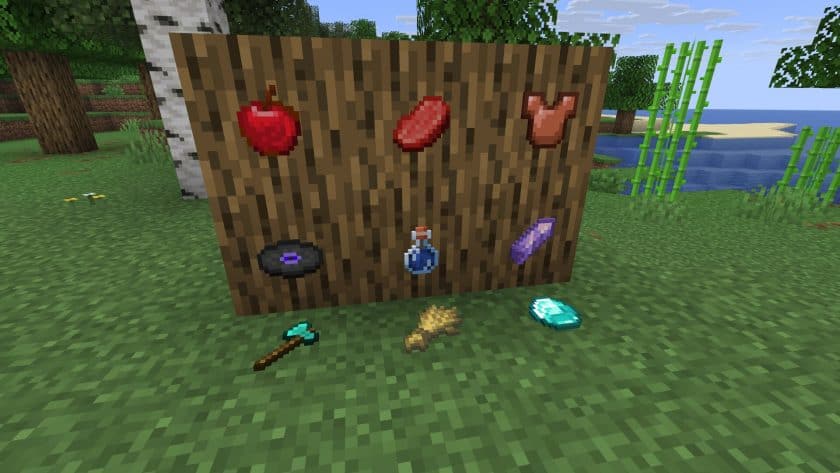 Invisible Item Frames
Invisible Item Frames Texture Pack Download
- We do not modify or edit any resource packs. All resource packs, shaders and tools found on this website are linked directly to official sources rather than hosted on our own servers. We provide only the official download links from the original creators to ensure that your files are safe and secure.
- These official links are updated manually and may occasionally stop working when a new version is released. We work hard to keep everything current so that you have a smooth experience. Please let us know in the comments if you find a link that no longer works.
- Minecraft is a trademark of Mojang Studios and has no official connection to this website. Our goal is simply to share the best creations from the community with other players.
- Please consider leaving a comment or voting for your favorite packs. This feedback helps authors improve their projects over time. You can also support the creators directly by visiting the official links located below the download section.
Java Edition:
[16x] [26.3.x – 1.4.x] Download Invisible Item Frames Resource Pack – Item Frame;
[16x] [26.3.x – 1.4.x] Download Invisible Glow Item Frames Resource Pack – Glow Item Frame;
[16x] [26.3.x – 1.4.x] Download Invisible Map Item Frames Resource Pack – Map Item Frame;
Curseforge: download starts automatically after a few seconds;
Mediafire: click the big blue button with the text "DOWNLOAD";
Google Drive: in the top right corner you will see a small download icon (down arrow), click it and the download should start;

3 votes
Look.. 3 users have already liked this pack. Give a diamond if you like it too!



Leave a reply
0 comments
Links in comments are not allowed. Comments containing links will be removed.
If your comments are consistently being deleted, please be sure to review our Comment Policy.