JumpyAcorn’s PvP resource pack stands out as a fantastic option for Minecraft players who want to dominate their opponents while still enjoying a bright, lively visual style. Built to completely refresh nearly every block and item in the game, this pack does a great job blending competitive functionality with a cheerful, colorful aesthetic. While a lot of PvP focused packs go for overly dark or stripped down looks just to boost frame rates, JumpyAcorn proves you can keep things fun and vibrant without losing the visual clarity you need for intense fights. Running at 32x resolution, which is honestly a bit unusual for a PvP pack, this one strikes a really nice balance between good looks and solid performance.
If your hardware is on the weaker side, you might want to look into 16x or even 8x packs instead, since those are built specifically to squeeze out extra fps. But if you’re running a decent average PC, JumpyAcorn’s PvP pack should run just fine without any issues. One of the best things about this pack is its versatility. You’re not locked into using it just for PvP, it works great for regular survival gameplay too, so there’s no need to keep switching resource packs depending on what you’re in the mood for. It’s a solid, all around choice that stays bright, colorful, and pretty close to that familiar default Minecraft look, making it a great pick whether you’re grinding ranked fights or just relaxing and building in your world.
JumpyAcorn’s PvP should be compatible with all of these Minecraft versions: 1.7.10 - 1.7.9 - 1.7.4 - 1.7 - 1.6.4 - 1.6.2
JumpyAcorn’s PvP — Screenshots
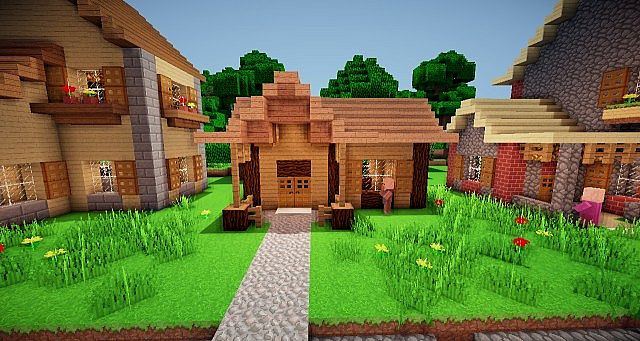
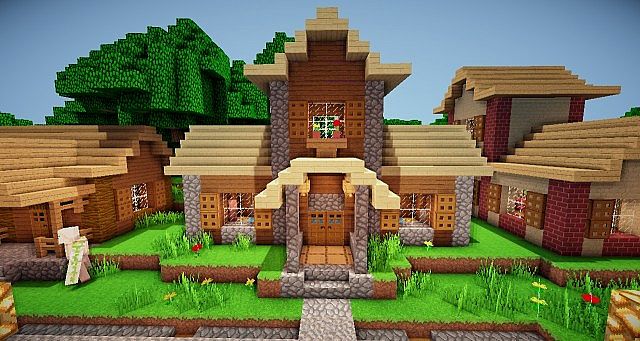
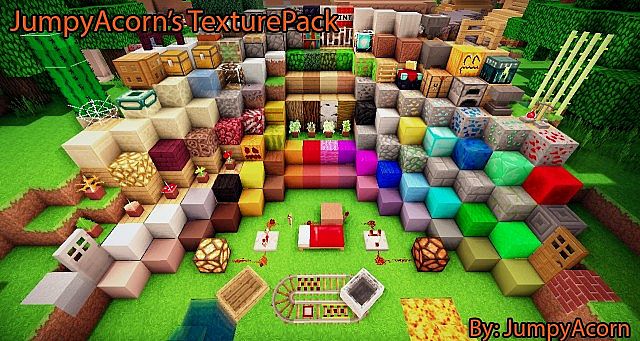
How to install JumpyAcorn’s PvP Resource Pack:
- Most resource packs require Optifine, so be sure to download and install it. – general recommended step for all packs, Optifine is also needed for most shaders
- Download the JumpyAcorn’s PvP texture pack for Minecraft from the download section below. – if there are many different versions, just choose the one you like, is compatible with your version/edition of Minecraft, the one you think your computer can handle in terms of performance.
- Launch the game client through the Minecraft launcher.
- On the main menu, click "Options".
- On the options menu, click "Resource Packs...".
- Click on "Open Resource Pack Folder". – folder titled "resourcepacks" will pop up
- Move the .zip file you downloaded in the first step to the newly opened "resourcepacks" folder.
- Click "Done".
- Click on "Resource Packs..." again.
- Your pack should have appeared in the left window, just hover over it and click on the arrow pointing to the right.
QUICK TIP: Sometimes, when activating a pack, the game may say that the pack is made for a newer or older version of Minecraft. This is just a warning, it does not affect your gameplay in anyway, and you can still activate and enjoy the pack by simply clicking the "Yes" button when prompted.
- Click "Done" again.
- The pack has now been successfully loaded and ready to be used in your world!
JumpyAcorn’s PvP Texture Pack Download
- We do not modify or edit any resource packs. All resource packs, shaders and tools found on this website are linked directly to official sources rather than hosted on our own servers. We provide only the official download links from the original creators to ensure that your files are safe and secure.
- These official links are updated manually and may occasionally stop working when a new version is released. We work hard to keep everything current so that you have a smooth experience. Please let us know in the comments if you find a link that no longer works.
- Minecraft is a trademark of Mojang Studios and has no official connection to this website. Our goal is simply to share the best creations from the community with other players.
- Please consider leaving a comment or voting for your favorite packs. This feedback helps authors improve their projects over time. You can also support the creators directly by visiting the official links located below the download section.
Java Edition:
[32x] [1.7.x – 1.6.x] Download JumpyAcorn’s PvP Resource Pack
Curseforge: download starts automatically after a few seconds;
Mediafire: click the big blue button with the text "DOWNLOAD";
Google Drive: in the top right corner you will see a small download icon (down arrow), click it and the download should start;

30 votes
Look.. 30 users have already liked this pack. Give a diamond if you like it too!

FuzzyPlaysYT
Are You using shaders