Simple As That resource pack is one of those older Minecraft packs that many players still remember, even though it no longer gets updates. It does not try to impress you with complex realistic textures. It aims for a clean, simple look that stays easy on the eyes. If you want a Minecraft world that feels calm, this pack fits that goal. It uses soft, maybe pastel-like colors and a minimalist approach. The result feels cozy. The biggest feature is its resolution. Simple As That runs at 8x, which is half the size of Minecraft’s default 16x textures. That choice shapes everything about how the pack looks and how it runs. With fewer pixels to work with, the pack removes a lot of tiny detail. You get less noise, which makes textures look clean from a distance. You also get a lighter load on your system, since the game has less texture data to handle. That performance benefit matters most on low-end hardware. If your computer struggles in busy areas, a lower resolution pack can help Minecraft feel more stable. Large towns, dense villages, farms with lots of blocks, and places with many light sources can push frame rates down. You might notice stutter when you turn your camera or when new chunks load. While texture resolution is not the only factor in performance, smaller textures can reduce strain and improve how the game feels, especially when your GPU or memory sits near its limit.
Simple As That texture pack often gets recommended for that reason. It can give you extra breathing room without forcing you to lower every video setting. The style feels like a softened version of Minecraft rather than a total redesign. It does not fight the game’s core look. Blocks still look like the blocks you know, just with a gentler touch. Colors stay friendly and balanced. The world can look brighter without needing extreme saturation. If you play long sessions, this softer look can reduce visual fatigue. At the same time, you should expect the limits that come with 8x art. Some players love the crisp, simplified look. Others feel it removes too much texture character, especially on natural blocks like stone, logs, and foliage. Because the pixel grid is so small, the pack has less space for subtle variation. That can make some areas look flat, mainly if you rely on textures to add depth. Version support is the other concern. Like many older packs, it may not cover newer blocks and items from recent Minecraft updates. When you use an old pack on a modern version, you can run into missing textures issue. The pack may still work in a basic sense, but the style can break where the game has content the pack never designed for. If you want a consistent look, you may need to play on a version that matches the pack’s original target, or accept that some newer blocks will not match.
Simple As That should be compatible with all of these Minecraft versions: 1.7.10 - 1.7.9 - 1.7.4 - 1.7 - 1.6.4 - 1.6.2
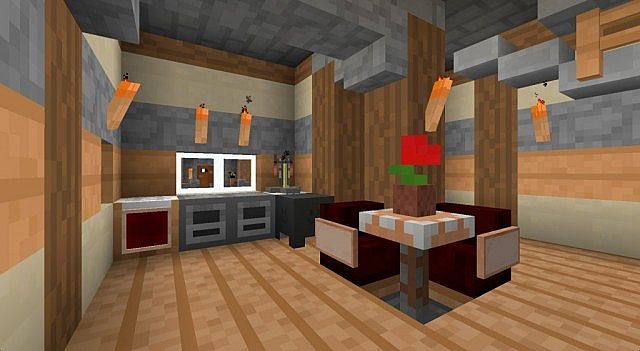
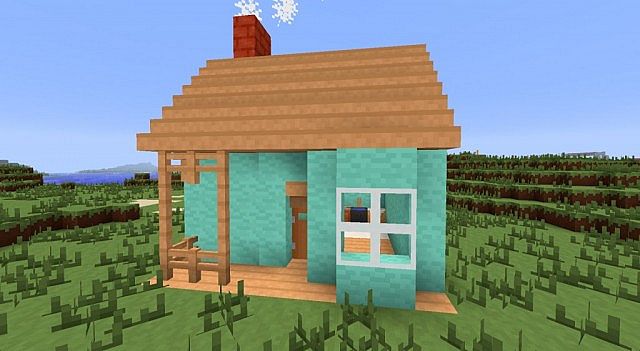
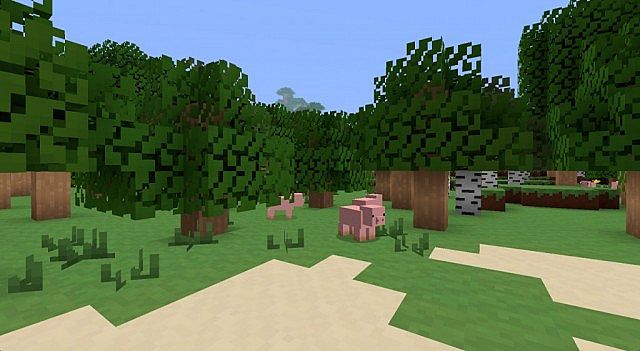
Simple As That — Screenshots
How to install Simple As That Resource Pack:
- Most resource packs require Optifine, so be sure to download and install it. – general recommended step for all packs, Optifine is also needed for most shaders
- Download the Simple As That texture pack for Minecraft from the download section below. – if there are many different versions, just choose the one you like, is compatible with your version/edition of Minecraft, the one you think your computer can handle in terms of performance.
- Launch the game client through the Minecraft launcher.
- On the main menu, click "Options".
- On the options menu, click "Resource Packs...".
- Click on "Open Resource Pack Folder". – folder titled "resourcepacks" will pop up
- Move the .zip file you downloaded in the first step to the newly opened "resourcepacks" folder.
- Click "Done".
- Click on "Resource Packs..." again.
- Your pack should have appeared in the left window, just hover over it and click on the arrow pointing to the right.
QUICK TIP: Sometimes, when activating a pack, the game may say that the pack is made for a newer or older version of Minecraft. This is just a warning, it does not affect your gameplay in anyway, and you can still activate and enjoy the pack by simply clicking the "Yes" button when prompted.
- Click "Done" again.
- The pack has now been successfully loaded and ready to be used in your world!
Simple As That Texture Pack Download
- We do not modify or edit any resource packs. All resource packs, shaders and tools found on this website are linked directly to official sources rather than hosted on our own servers. We provide only the official download links from the original creators to ensure that your files are safe and secure.
- These official links are updated manually and may occasionally stop working when a new version is released. We work hard to keep everything current so that you have a smooth experience. Please let us know in the comments if you find a link that no longer works.
- Minecraft is a trademark of Mojang Studios and has no official connection to this website. Our goal is simply to share the best creations from the community with other players.
- Please consider leaving a comment or voting for your favorite packs. This feedback helps authors improve their projects over time. You can also support the creators directly by visiting the official links located below the download section.
Java Edition:
[8x] [1.7.x – 1.6.x] Download Simple As That Resource Pack
Curseforge: download starts automatically after a few seconds;
Mediafire: click the big blue button with the text "DOWNLOAD";
Google Drive: in the top right corner you will see a small download icon (down arrow), click it and the download should start;

18 votes
Look.. 18 users have already liked this pack. Give a diamond if you like it too!


Leave a reply
0 comments
Links in comments are not allowed. Comments containing links will be removed.
If your comments are consistently being deleted, please be sure to review our Comment Policy.